

विवरण
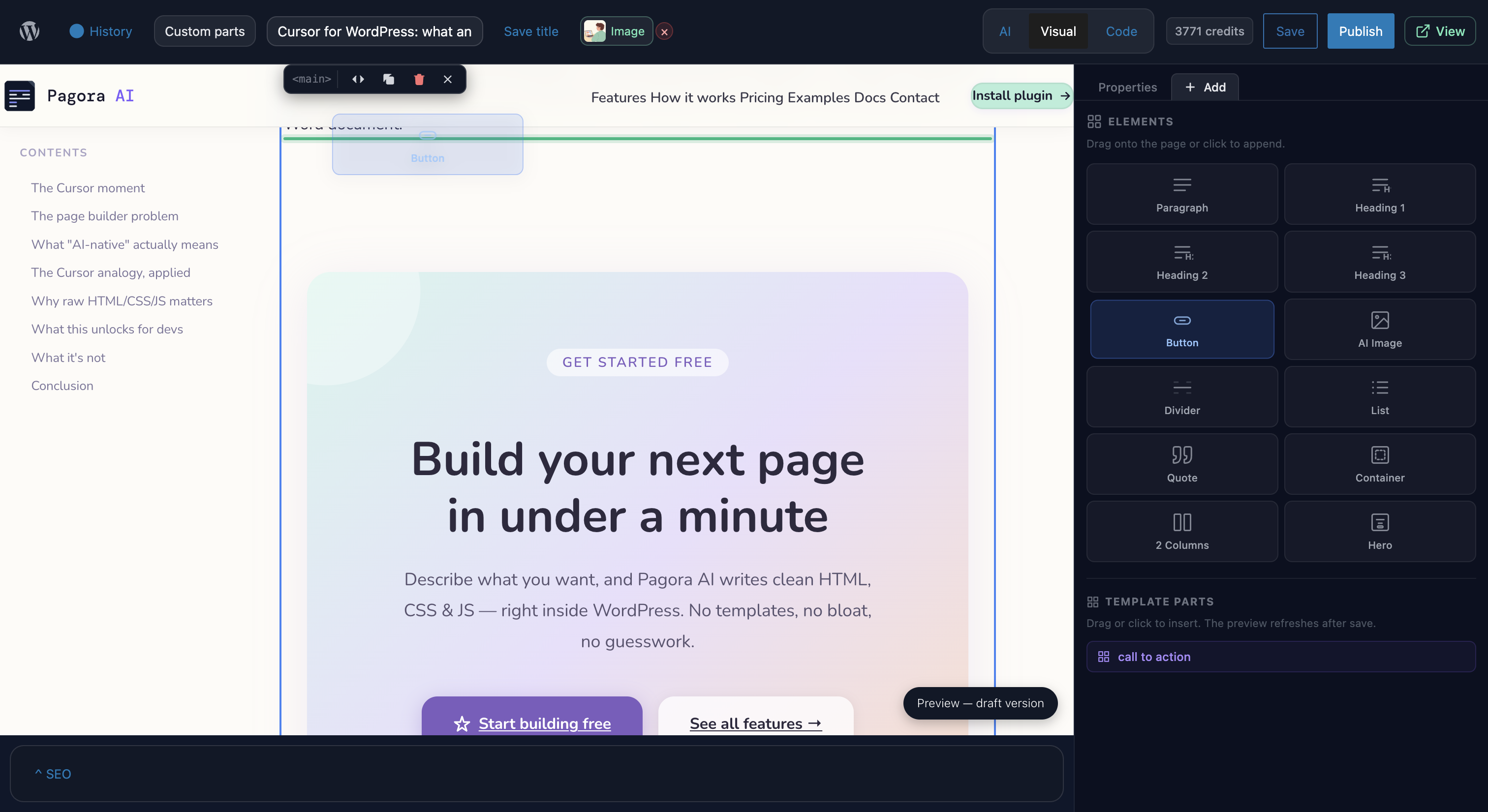
Pagora AI is an AI-powered page builder for WordPress. Instead of dragging and dropping blocks, simply describe the page you want — the AI generates complete HTML/CSS/JS code that you can refine by continuing the conversation or editing directly in the code panel.
Key features
- AI chat — describe your page in plain language; the AI produces complete HTML/CSS/JS with animations and UnoCSS utility styles (Tailwind syntax).
- Code editor — built-in CodeMirror editor with HTML/CSS/JS syntax highlighting, auto-formatting, and keyboard shortcuts.
- Live preview — isolated iframe preview that updates instantly after every edit or AI response.
- Version history — every save creates a snapshot; restore any version in one click.
- AI images — generate and insert images directly from the editor.
- SEO panel — title, meta description, and featured image controls per page.
- Templates — save your pages as reusable templates.
- Alpine.js + Motion One bundled — declarative interactivity and smooth animations with no extra dependencies.
How it works
This plugin is a client for the Pagora AI service. No AI model runs locally.
- Install and activate the plugin.
- Create an account at pagora-ai.com and connect it from Settings Pagora AI.
- Open any WordPress page and click Edit with Pagora AI to open the editor.
- Describe your page in the chat and publish.
Data and privacy
This plugin connects exclusively to the Pagora AI service (https://api.pagora-ai.com) to process your prompts and generate page code. No data is sent to any other third party.
- Prompts and generated code transit through our servers for processing.
- See our Privacy Policy and Terms of Service.
- The plugin collects no telemetry of its own.
Bundled libraries
The following libraries are included in the plugin (all GPL-compatible):
- UnoCSS Runtime — MIT
- Alpine.js — MIT
- Motion One — MIT
- CodeMirror — MIT
- Symfony DomCrawler / CssSelector — MIT (isolated via php-scoper)
- Masterminds HTML5-PHP — LGPL-2.1
Source code and build instructions
The JavaScript and CSS bundles included in this plugin are compiled from TypeScript/TSX source files. The full, unminified source is publicly available at:
https://github.com/Enkic/pagora-ai-plugin
To build from source:
- Clone the repository.
- Run
npm installto install dependencies. - Run
npm run buildto compile all bundles intoassets/build/andassets/editor/build/.
Build tool: Webpack (via @wordpress/scripts). Node 18+ required.
स्क्रीनशॉट्स


इंस्टॉलेशन
- Download the ZIP and upload it via Plugins Add New Upload Plugin, or extract it into
/wp-content/plugins/. - Activate the plugin from the Plugins menu.
- Go to Settings Pagora AI and connect your account.
- On any page, click Edit with Pagora AI in the page list.
सामान्य प्रश्न
-
Do I need an account to use the plugin?
-
Yes. The plugin is a client for the Pagora AI service. An account is required to access the AI.
-
What kind of content can I create?
-
The plugin generates complete pages in HTML/CSS/JS. It supports UnoCSS utility classes (Tailwind syntax), Alpine.js for interactivity, and Motion One for animations.
-
Will Pagora AI break my theme?
-
No. The plugin creates standalone pages that replace theme rendering only on pages where you have explicitly activated Pagora AI. Your theme stays intact.
-
What WordPress capabilities are required?
-
Access to the editor requires the
unfiltered_htmlcapability (typically Administrators and Super Administrators). Settings management requiresmanage_options. -
Are Pagora AI pages compatible with caching plugins?
-
Yes. Compiled assets are stored with hashed filenames in
wp-content/uploads/pagora-ai/. The plugin includes cache purge integrations for WP Rocket, W3 Total Cache, and LiteSpeed Cache. -
What happens if I deactivate the plugin?
-
Pages created with Pagora AI will display their content normally via the active theme. Deactivating the plugin suspends the custom rendering but no data is lost.
-
What does uninstalling remove?
-
Uninstalling (
uninstall.php) removes all plugin options, page metadata, user tokens, and generated asset files inuploads/pagora-ai/. The WordPress page content itself is preserved.
समीक्षाएं
इस प्लगइन के लिए कोई समीक्षा नहीं है।
सहायक &डेवलपर्स

Translate “Pagora AI” into your language.
Interested in development?
Browse the code, check out the SVN repository, or subscribe to the development log by RSS.
बदलाव विवरण
1.0.0
- Initial public release.
- Full AI editor with chat, live preview, and code editor.
- Version management and snapshots.
- AI image generation and insertion.
- Built-in SEO panel.
- Reusable template system.
- Alpine.js, Motion One, and UnoCSS bundled for generated pages.
- Complete REST API under
pagora-ai/v1/. - Cache purge integrations (WP Rocket, W3TC, LiteSpeed).
1.0.1
- Credit system updates