

विवरण
Order Source Analytics for WooCommerce helps you understand where your WooCommerce sales really come from.
Instead of guessing which traffic channels work best, this plugin gives you a clear and visual breakdown of orders and revenue by traffic source — including Google Ads, Organic Search, Facebook, Direct traffic, referrals and UTM-based campaigns.
The plugin is lightweight, fast, and optimized for large stores using aggregated queries.
It is fully compatible with WooCommerce HPOS (High-Performance Order Storage).
100% free. No upsells. Built with love ❤️
Key Features
- Analyze orders and revenue by traffic source
- Supports Google Ads, Organic Search, Facebook, Direct, Referral, UTM campaigns and more
- Beautiful charts: Pie, Bar and Line (daily revenue)
- KPIs dashboard: Orders, Revenue, AOV and Top Source
- Filter by date range and order status
- Top traffic sources table with revenue share
- Export full report to CSV
- Optimized queries for large WooCommerce stores
- Fully compatible with WooCommerce HPOS
- No configuration required — works out of the box
- Translation-ready — fully internationalized with a complete
.pottemplate - Hebrew translation included with full RTL (right-to-left) support for Hebrew WordPress sites
Supported Traffic Sources
The plugin automatically detects and normalizes common WooCommerce attribution sources, including:
- Google Ads
- Google Organic
- Direct traffic
- Referral traffic
- UTM-based campaigns
- Unknown / fallback traffic
Who Is This Plugin For?
- WooCommerce store owners
- Marketing and performance teams
- Agencies managing multiple WooCommerce stores
- Anyone who wants clear attribution insights inside WordPress
स्क्रीनशॉट्स
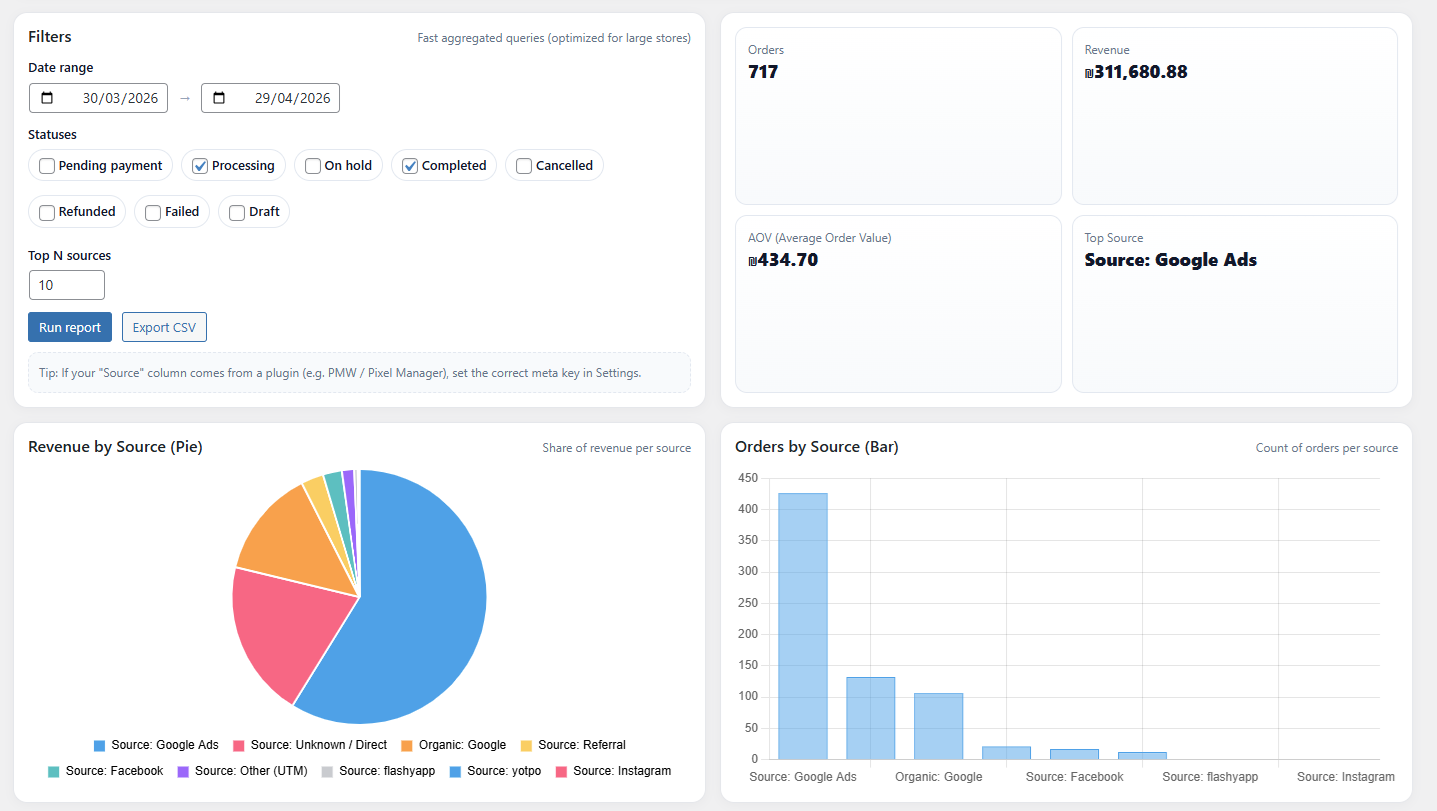
Analytics dashboard with KPIs and filters 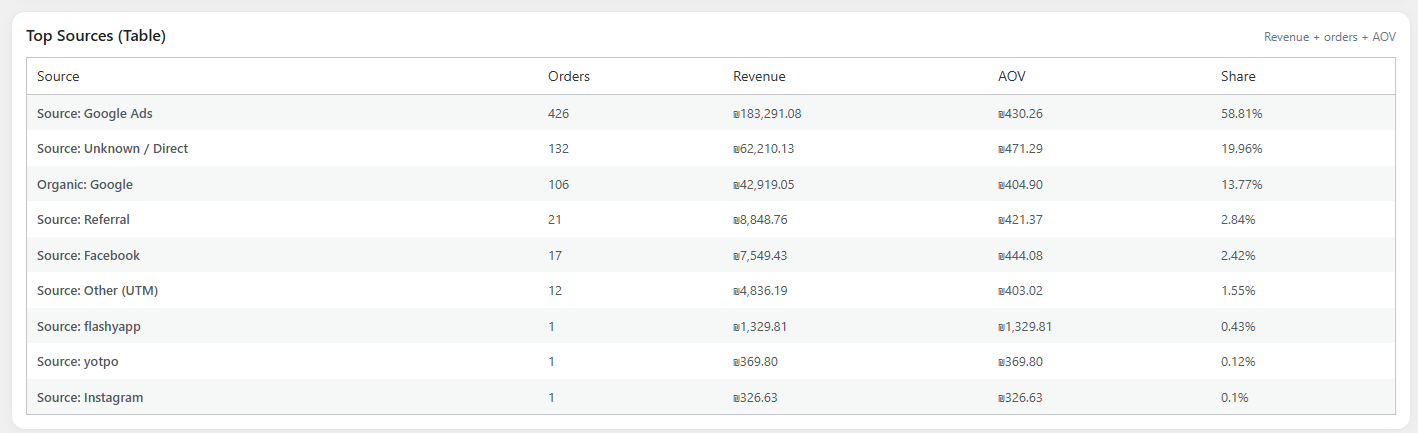
Revenue distribution by traffic source (pie chart) 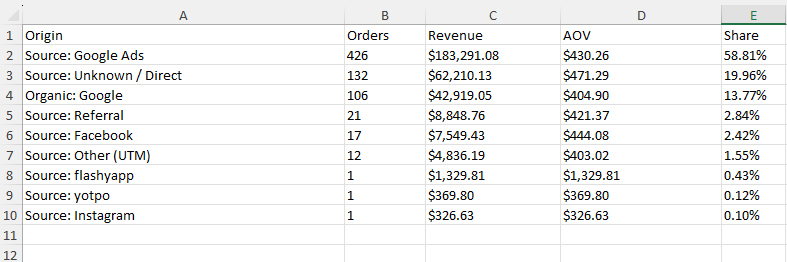
Orders by source (bar chart)
इंस्टॉलेशन
- Upload the plugin files to the
/wp-content/plugins/order-source-analytics-for-woocommercedirectory, or install the plugin directly from the WordPress plugins screen. - Activate the plugin through the “Plugins” screen in WordPress.
- Open WooCommerce Order Source Analytics.
- Run your first report — no setup required.
सामान्य प्रश्न
-
Does this plugin require any configuration?
-
No. The plugin works out of the box using WooCommerce order attribution data.
-
Is this plugin compatible with HPOS?
-
Yes. The plugin is fully compatible with WooCommerce High-Performance Order Storage (HPOS).
-
Can I export the data?
-
Yes. You can export the report to a CSV file for further analysis in Excel or Google Sheets.
-
No. The plugin only analyzes existing WooCommerce order data and does not track visitors.
-
Is the plugin really free?
-
Yes. 100% free, with no ads, no upsells and no limitations.
-
Is the plugin available in Hebrew? Does it support RTL?
-
Yes. A full Hebrew (he_IL) translation is bundled with the plugin and loaded automatically when the WordPress site language is set to Hebrew. The admin interface also includes a dedicated RTL stylesheet that switches the layout to right-to-left, so the dashboard reads naturally in Hebrew.
-
Can I translate the plugin to another language?
-
Yes. The plugin is fully translation-ready and ships with a
.pottemplate inside thelanguages/folder. You can translate it using tools like Poedit or contribute through the WordPress.org translation platform.
समीक्षाएं
इस प्लगइन के लिए कोई समीक्षा नहीं है।
सहायक &डेवलपर्स

Translate “Order Source Analytics for WooCommerce” into your language.
Interested in development?
Browse the code, check out the SVN repository, or subscribe to the development log by RSS.
बदलाव विवरण
1.0.1
(2026-04-29)
* Narrow down the tag list to the 5 most relevant tags
1.0.0
- Initial release
- Order source analytics dashboard
- Charts, KPIs and CSV export
- HPOS compatibility
- Full internationalization (i18n) support with
.pottemplate - Hebrew (he_IL) translation included with full RTL stylesheet