विवरण
आखिरकार, एक WordPress analytics जिसे आप वाकई इस्तेमाल करेंगे
Google Analytics बहुत ज़्यादा जटिल है। ज़्यादातर दूसरे WordPress statistics plugins अव्यवस्थित और भ्रामक हैं। आप बस visitors ट्रैक करना चाहते हैं और जानना चाहते हैं कि आपकी साइट पर क्या हो रहा है — बिना किसी data science की डिग्री के।
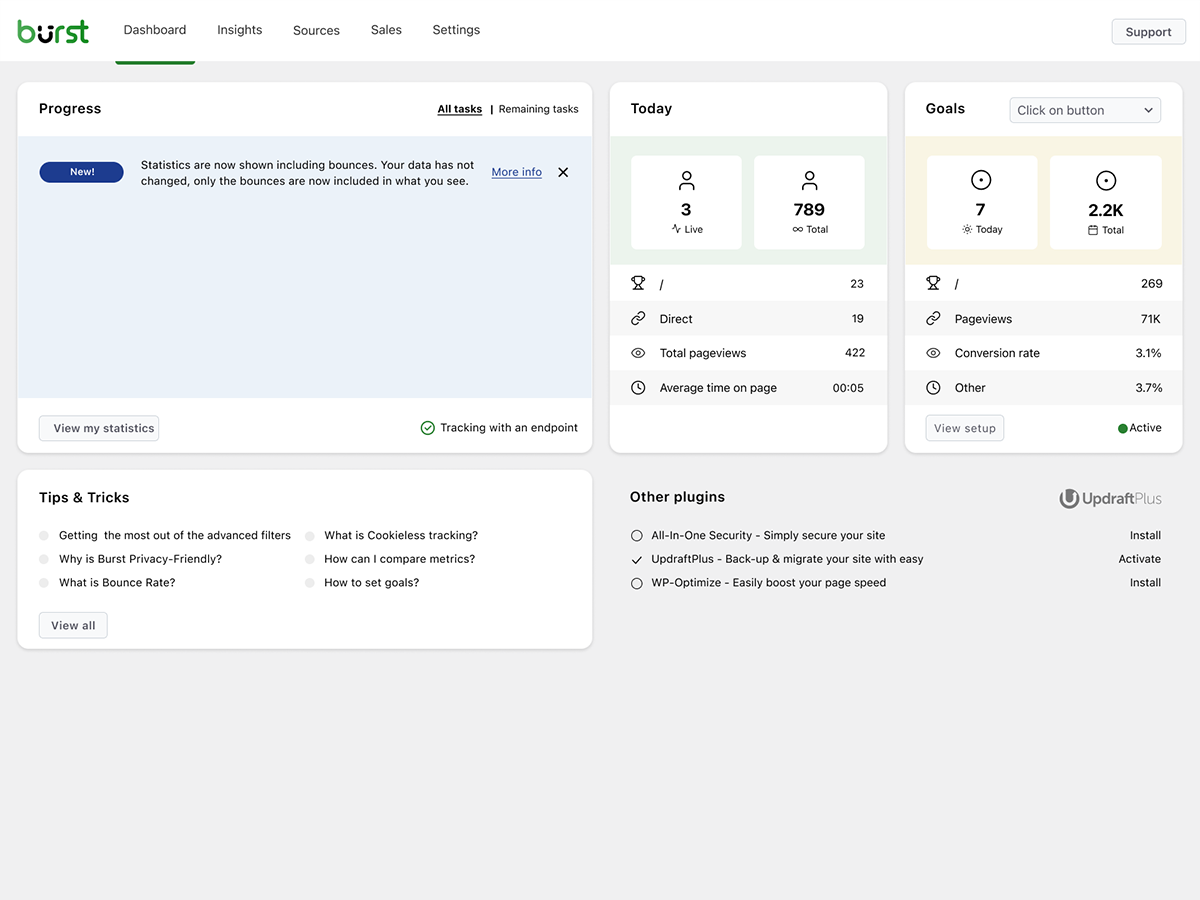
Burst Statistics तुम्हें एक साफ, सहज analytics dashboard देता है जो उन metrics पर focused है जो असल में मायने रखती हैं। कोई external analytics account नहीं। कोई जटिल setup नहीं। Install करो, activate करो, और सेकंडों में अपनी website traffic समझो।
200,000+ WordPress साइट्स का भरोसा। Team Updraft द्वारा बनाया गया, जो UpdraftPlus, WP-Optimize और All-In-One Security (AIOS) के लिए जाने जाते हैं।
हमारे उपयोगकर्ता क्या कह रहे हैं
“आखिरकार, एक ऐसा analytics plugin जिसे मैं clients को आसानी से समझा सकता हूँ।”
— @anguskeystone on wordpress.org“मैंने WP Statistics और Independent Analytics आज़माए, लेकिन वे बहुत जटिल और उलझे हुए हैं। Burst का UI सहज है और उन चीज़ों पर केंद्रित है जो मेरे लिए मायने रखती हैं।”
— @vallered on wordpress.org
Burst Statistics क्यों?
Analytics जो actionable हो
दूसरे analytics plugins सब कुछ एक साथ दिखा देते हैं। Burst वो दिखाता है जो मायने रखता है — visitors, pageviews, referrers, top pages — एक ऐसे dashboard में जिसे तुम असल में इस्तेमाल करोगे। कोई data overload नहीं। कोई confusing menus नहीं। देखो Burst bloggers के लिए क्यों perfect है।
डिज़ाइन से ही privacy analytics
सभी साइट stats तुम्हारे सर्वर पर रहती हैं, जो Burst को एक सच्चा local analytics solution बनाता है। कोई external tracking नहीं। तुम्हारा डेटा तुम्हारा है — हम इसे तुम्हारी स्पष्ट अनुमति के बिना कभी नहीं देखते। पढ़ो Burst Statistics privacy-friendly क्यों है।
बिना किसी झंझट के setup
Install करो, activate करो, बस हो गया। कोई Google Analytics account नहीं, कोई GA4 setup नहीं, कोई tracking codes नहीं, कोई configuration की परेशानी नहीं। तुरंत live visitors देखना शुरू करो। analytics में नए हो? हमारी WordPress analytics guide से शुरुआत करो।
WordPress-native analytics
किसी दूसरे platform से port नहीं किया गया। खास तौर पर WordPress के लिए बनाया गया, native performance और seamless integration के साथ। WooCommerce, blogs, business sites और membership sites के साथ काम करता है।
Lightweight analytics, डिफ़ॉल्ट रूप से तेज़
Optimized database queries। 4 KB से छोटा tracking script। कोई external dependencies नहीं जो तुम्हारे pages को धीमा करें। aggressive server-side caching में भी सटीक ट्रैकिंग के लिए डिज़ाइन किया गया। सबूत देखो क्या Burst मेरी वेबसाइट को धीमा करता है में।
विशेषताएँ
अपनी वेबसाइट का ट्रैफ़िक समझें
- एक नज़र में सबसे अच्छा प्रदर्शन करने वाले pages और posts देखें
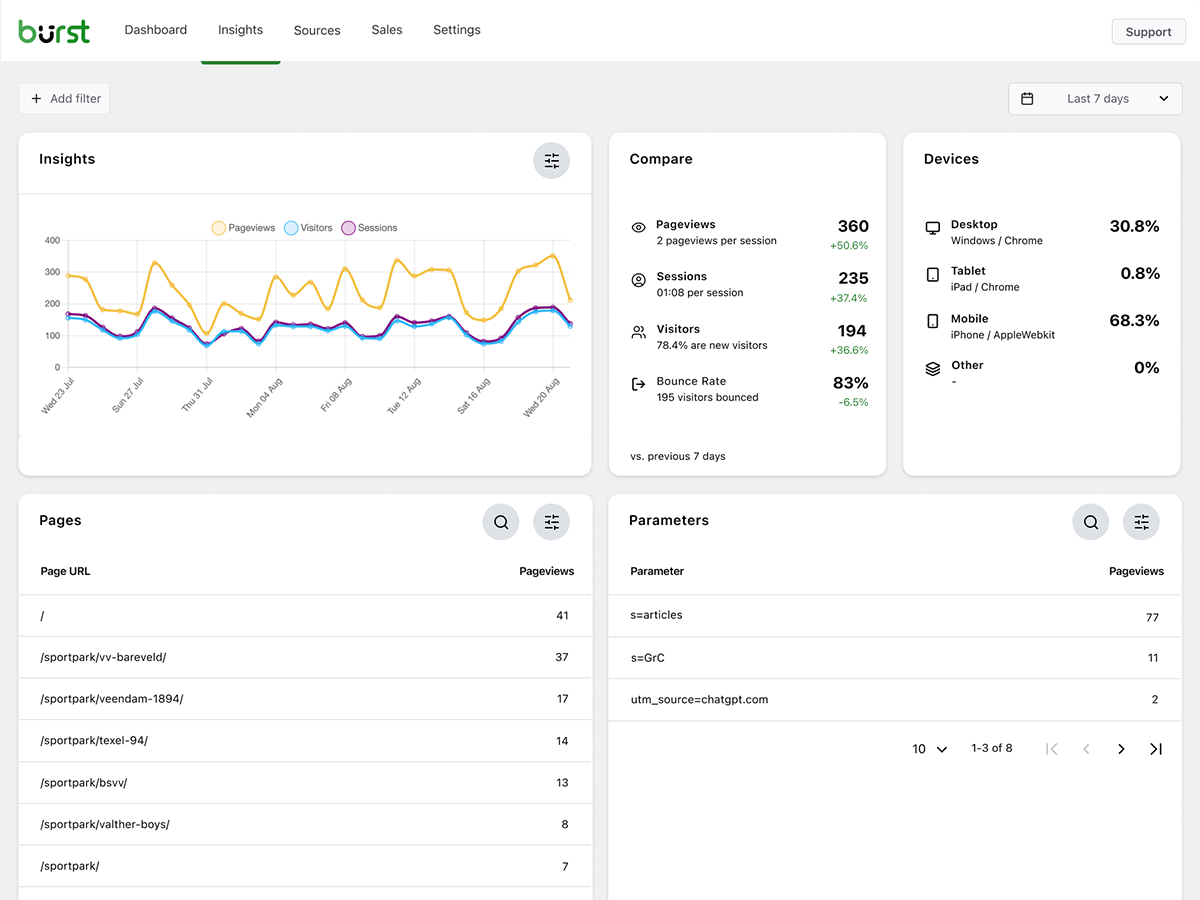
- मुख्य metrics ट्रैक करें: visitors, sessions, pageviews, bounce rate
- Breakdown of visitors by device (desktop, tablet, mobile)
- डेटा को कस्टम तारीख रेंज के अनुसार फ़िल्टर करें
- अलग-अलग समय अवधियों के बीच ट्रैफ़िक की तुलना करें
- Search Console integration, view Google searches right on your dashboard
रियल-टाइम एनालिटिक्स
- लाइव विज़िटर्स के लिए वास्तविक समय स्रोत की पहचान करें
- देखें कि users अभी कौन-से pages पर जा रहे हैं
- आपकी साइट पर active users की live गिनती
देखें कौन सा कंटेंट अच्छा कर रहा है
- दृश्यों के आधार पर रैंक किए गए शीर्ष पृष्ठ और पोस्ट
- किसी भी तारीख की अवधि की तुलना करें
- प्रत्येक पेज की परफॉर्मेंस को ट्रैक करें
कस्टम conversion और goal ट्रैकिंग
- Track views, clicks and WordPress hooks
- WooCommerce analytics और sales ट्रैक करें (Burst Pro Business)
- कस्टम events और conversions ट्रैक करें
- हमारी goals गाइड में चरण-दर-चरण सेटअप
बिना समझौते के privacy-friendly analytics
- 100% self-hosted, सभी statistics आपके WordPress database में locally स्टोर होती हैं
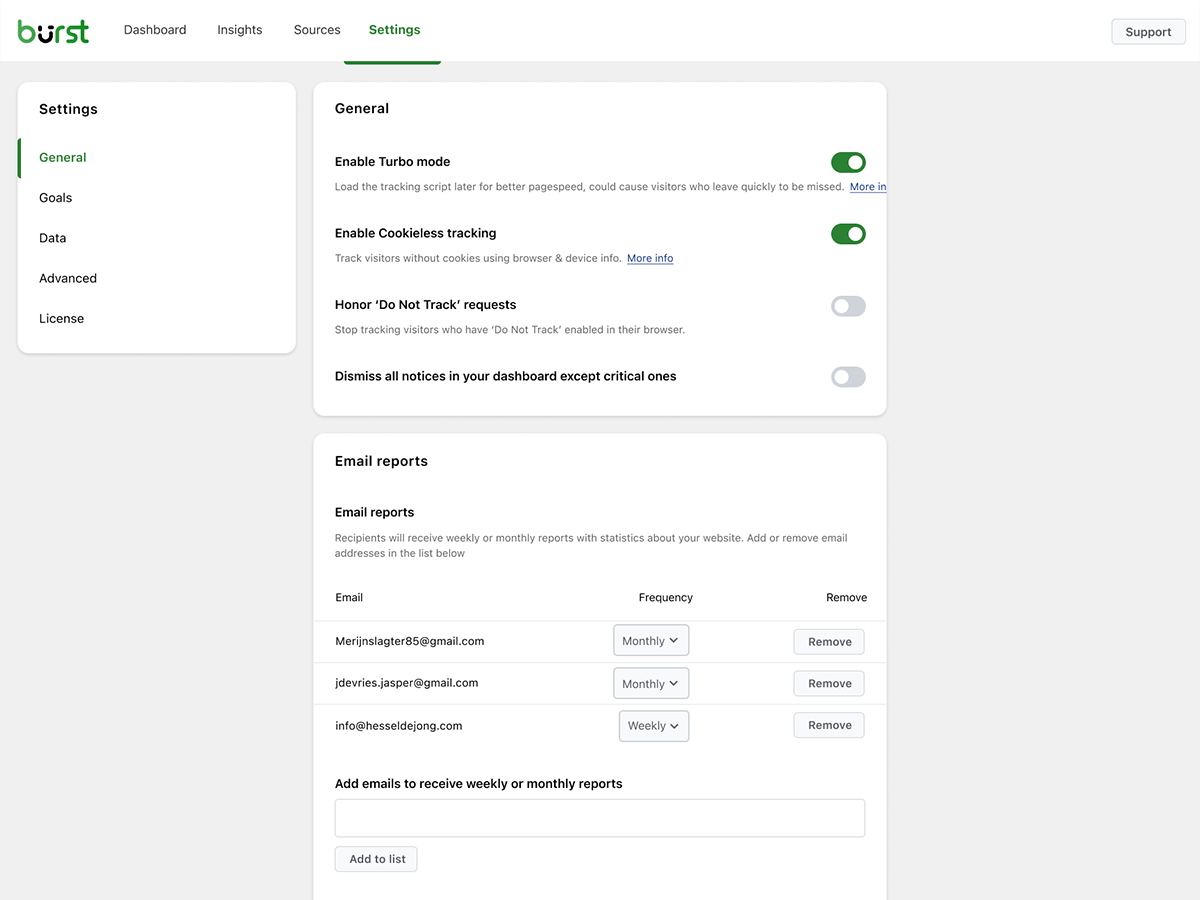
- Cookieless ट्रैकिंग विकल्प, एक cookie-free analytics सेटअप जिसमें कई देशों में consent banner की ज़रूरत नहीं
- GDPR, CCPA, DSGVO, AVG, RGPD और PECR compliance को सपोर्ट करने के लिए डिज़ाइन किया गया analytics
- Google, Facebook या किसी तीसरे पक्ष के साथ कोई डेटा साझा नहीं किया जाता
सूचित रहें
- साप्ताहिक या मासिक ईमेल रिपोर्ट्स आपके इनबॉक्स में भेजी जाती हैं
- रुझानों को पहचानने के लिए अवधियों की तुलना करें
- जब ट्रैकिंग काम नहीं करती है तो सूचित किया जाए
WordPress का अपना Google Analytics विकल्प
अगर तुम Google Analytics से आगे बढ़ चुके हो, या GA4 कभी चाहा ही नहीं था, तो Burst तुम्हारे लिए बना है। Google Analytics alternative के रूप में, Burst GA4 की complexity को clarity से बदलता है। तुम्हें एक ही dashboard पर ज़रूरी metrics मिलती हैं — बिना sampling, बिना data thresholding, और बिना अपने visitors को Google के ad network से गुज़ारे।
GA4 Google के ad business को बेहतर बनाने के लिए बना है। Burst तुम्हारी वेबसाइट को बेहतर बनाने के लिए बना है।
पूरी तस्वीर जानना चाहते हो? पढ़ो WordPress साइट owners Google Analytics क्यों छोड़ रहे हैं या सीधी तुलना Burst Statistics vs Google Analytics।
UpdraftPlus, WP-Optimize और All-In-One Security बनाने वाली टीम से
Burst Statistics, Team Updraft का हिस्सा है — वो team जिसने market के कुछ सबसे ज़्यादा install किए जाने वाले WordPress plugins बनाए हैं:
- UpdraftPlus – WP backup and migration plugin
- WP-Optimize – cache, image compression, minification और database cleanup
- All-In-One Security (AIOS) – security और firewall
Burst Statistics किसके लिए है?
Burst किसी भी WordPress साइट के लिए काम करता है, लेकिन हमने उन चार audiences के लिए खास solutions बनाए हैं जो इससे सबसे ज़्यादा फायदा उठाते हैं:
- Bloggers और content creators, देखो कौन सी posts तुम्हारे audience को पसंद आती हैं
- Entrepreneurs और small business owners, बिना किसी उलझन के अपना traffic और campaigns समझो
- WooCommerce stores, visitor behavior, revenue और product performance ट्रैक करो
- Agencies और freelancers, कई client sites के लिए analytics और reporting मैनेज करो
- Privacy को लेकर सजग साइट owners, consent banners के बिना GDPR-compliant analytics
- Google Analytics से थक चुके लोग, confusion की जगह clarity पाएँ
फ्री बनाम प्रो
Burst Statistics (free) में वह सब कुछ है जो आपको अपनी वेबसाइट का ट्रैफ़िक समझने के लिए चाहिए। Visitors, pageviews, referrers, top content, device stats, goal tracking, email reports और भी बहुत कुछ।
Burst Pro businesses और professionals के लिए advanced features जोड़ता है। pricing page पर सभी plans की तुलना करो।
CREATOR PLAN
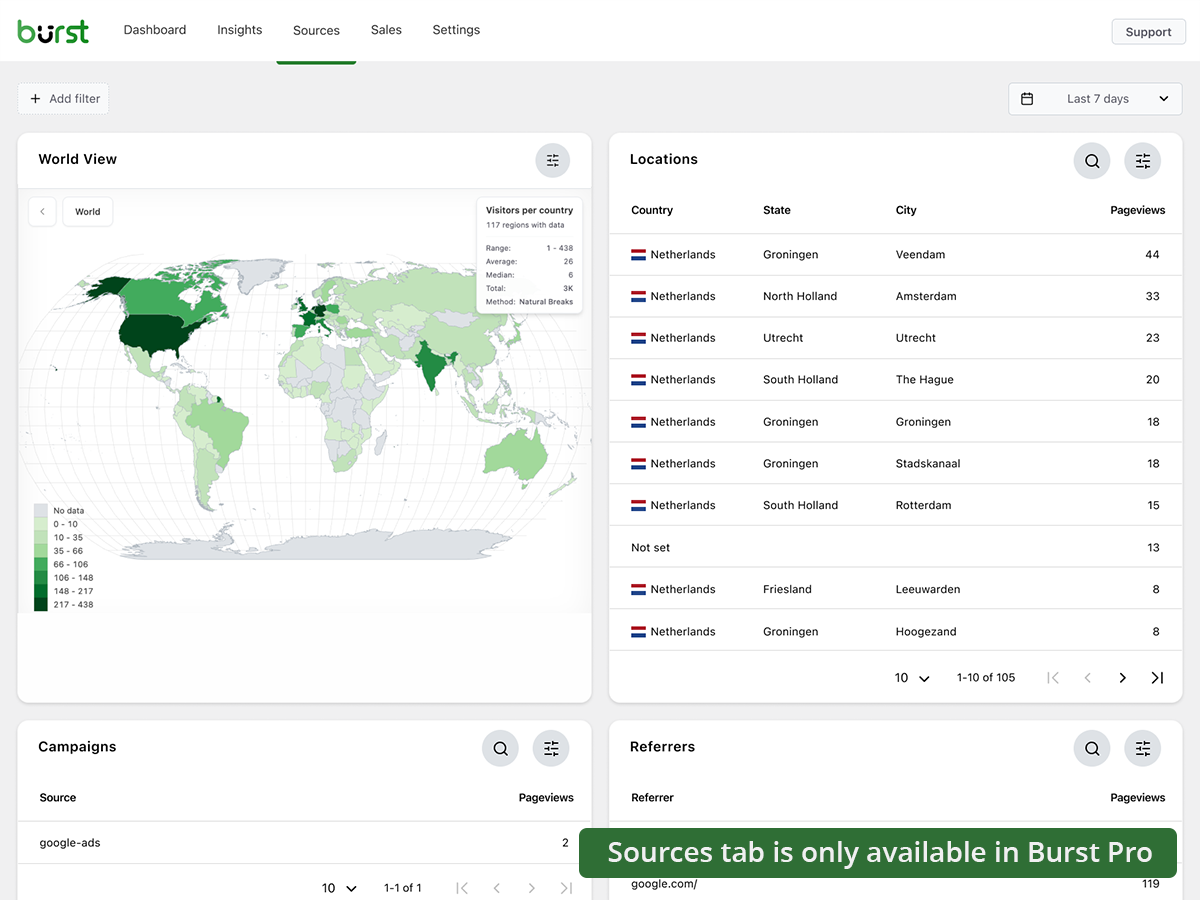
- UTM campaign tracking, देखो कौन सी marketing कोशिशें काम आ रही हैं
- Geographic data, country और city level पर visitor insights
- Advanced filtering, किसी भी dimension से data को segment करो
- Data archiving settings, अपना database अपने आप lean रखो
- Priority support, हमारे developers से सीधा संपर्क
BUSINESS PLAN
- Creator plan की सभी सुविधाएँ, साथ में
- पूरा WooCommerce sales dashboard, देखो कौन सा content सबसे ज़्यादा revenue लाता है
- Revenue attribution, WooCommerce sales को traffic sources से जोड़ो
AGENCY PLAN
- Business plan की सभी सुविधाएँ, साथ में
- Reporting, clients के लिए shareable performance reports बनाओ
सभी Burst Pro plans में priority support शामिल है। आपका सीधा संपर्क हमारे developers से होगा, असली इंसानों से, किसी chatbot से नहीं।
Burst की तुलना अन्य WordPress analytics plugins से कैसे होती है
हमसे अक्सर पूछा जाता है कि Burst दूसरे tools से कैसे तुलना करता है। ईमानदार, संक्षिप्त जवाब:
- Google Analytics / GA4, GA4 शक्तिशाली है लेकिन site owners के लिए नहीं, advertisers के लिए बना है। यह जटिल है, तुम्हारे numbers पर sampling और thresholding लगाता है, और ज़्यादातर देशों में cookie banner की ज़रूरत होती है। Burst एक आसान, privacy-friendly GA4 alternative है जो बिना किसी setup के असली numbers दिखाता है। पूरी तुलना पढ़ो।
- MonsterInsights, MonsterInsights एक connector है जो तुम्हारा डेटा Google Analytics में भेजता है। अगर तुम एक सच्चा MonsterInsights alternative चाहते हो जो डेटा Google को भेजने की बजाय तुम्हारी अपनी साइट पर रखे, तो Burst बेहतर विकल्प है।
- Independent Analytics, एक respectful competitor जिसका privacy-first, WordPress-native approach मिलता-जुलता है। Burst actionable dashboards, गहरी UTM और goal tracking, WooCommerce revenue analytics और Agency-tier reporting पर ज़्यादा ज़ोर देता है। दोनों आज़माओ और जो पसंद आए वो चुनो।
- Koko Analytics, एक साफ-सुथरा, lightweight विकल्प जो basics पर focus करता है। Burst इससे आगे जाता है — goal tracking, real-time analytics, UTM campaigns, WooCommerce analytics और email reports के साथ।
- WP Statistics, एक पुराना WordPress stats plugin जिसमें बहुत सारे options हैं। कई users को इसका interface cluttered लगता है। Burst एक ऐसे single, clear dashboard पर ध्यान देता है जो feature count से ज़्यादा clarity के लिए बना है।
- Matomo, self-hostable और feature-rich, लेकिन चलाने में भारी और ज़्यादा जटिल। Burst एक आसान, तेज़ और पूरी तरह WordPress-native विकल्प है।
उपयोगी गाइड और संसाधन
Metrics समझो, आम समस्याएँ ठीक करो, अपने analytics से ज़्यादा फायदा उठाओ। सब कुछ फ्री, सब कुछ burst-statistics.com पर।
शुरुआत करना
- WordPress analytics और वो metrics जो असल में मायने रखती हैं
- WordPress Repository से Burst Statistics कैसे install करें
- अपना पहला goal कैसे सेट करें
Privacy और GDPR
- Burst Statistics privacy-friendly क्यों है
- बिना cookie banner के अपनी वेबसाइट कैसे configure करें
- Burst बिना cookies के website visitors को कैसे ट्रैक करता है
Metrics और data interpretation
- WordPress में bounce rate कैसे कम करें
- Bounce rate क्या होता है?
- Pageview क्या होता है?
- Conversion rate क्या होता है?
Campaigns और conversions
- UTM (और Burst) parameters को कैसे ट्रैक करें
- Campaign URL builder
- Burst के साथ marketing campaigns कैसे बनाएँ और A/B test करें
WooCommerce
- WooCommerce cart abandonment कम करने के 10 आज़माए हुए तरीके
- Burst Pro में WooCommerce के लिए sales analytics का परिचय
ज़्यादा जानकारी के लिए पूरा Learn hub देखो।
इंस्टॉलेशन
- अपने WordPress dashboard में Plugins → Add New पर जाएँ
- Burst को खोजें
- Install Now पर क्लिक करें, फिर Activate करें
- अपना analytics देखने के लिए Statistics → Dashboard पर जाएँ
बस इतना ही। कोई बाहरी account नहीं। कोई tracking code paste नहीं करना। Burst तुरंत साइट stats इकट्ठा करना शुरू कर देता है।
मैन्युअली या Composer से install करना पसंद है? देखो Composer से Burst Statistics install करना।
External services
Burst works entirely on your own server and does not send your data anywhere. The two optional features below are the only ones that contact an external service, and neither is required to use Burst. Please see our privacy statement for our privacy policy; each feature below links to its own, more specific policy.
Google Search Console integration (optional)
When you connect your Google account on the Integrations settings page, Burst retrieves your search performance data (queries, clicks, impressions and positions) from the Google Search Console API (googleapis.com) and shows it in your dashboard. This is a one-way flow: your site fetches data from Google, and no visitor or statistics data is sent to Google or to us. Only the OAuth handshake and token refresh run through our relay at search-console.burst-statistics.com; the retrieved search data goes directly from Google to your own site. Nothing happens until you connect an account, and you can disconnect at any time, which revokes the token at Google. Read our Search Console integration privacy policy, and see Google’s privacy policy and Google API Services User Data Policy.
Anonymous data sharing (optional)
This is the only case in which Burst sends data to us, and it is strictly opt-in. When you choose to enable it, Burst periodically sends anonymized, aggregated usage and performance statistics (no visitor data, no personal data) to api.burst-statistics.com. In return you get community performance benchmarks in your dashboard, comparing your site against anonymized community averages, and it helps us improve the plugin. Read how we handle anonymous usage data.
Credits
Country-level geographic data is provided by the MaxMind GeoLite2 database. This product includes GeoLite2 Data created by MaxMind, available from https://www.maxmind.com/.
स्क्रीनशॉट्स


ब्लॉकस
यह प्लगइन 1 ब्लॉक प्रदान करता है।
- Pageviews Counter
सामान्य प्रश्न
क्या Burst Statistics सच में फ्री है?
हाँ। Burst Statistics 100% फ्री है, बिना किसी tracking limit के। Burst Pro उन users के लिए optional है जिन्हें UTM tracking, revenue attribution, geographic data या client reporting जैसे advanced features चाहिए। इसी तरह हम ज़्यादातर users के लिए Burst Statistics को फ्री रख पाते हैं।
डेटा कहाँ स्टोर होता है?
सभी statistics तुम्हारे अपने WordPress database में स्टोर होती हैं। Google Analytics या cloud-based tools के विपरीत, हमारी तुम्हारे डेटा तक कोई पहुँच नहीं है। तुम्हारा डेटा कभी तुम्हारे सर्वर से बाहर नहीं जाता, जब तक कि तुम खुद anonymous usage insights हमारे साथ share करने का विकल्प न चुनो। पढ़ो Burst तुम्हारे डेटा को कैसे handle करता है।
क्या Burst एक अच्छा Google Analytics विकल्प है?
हाँ। अगर GA4 तुम्हें बहुत जटिल लगता है, या तुम विज़िटर डेटा Google को भेजने से बचना चाहते हो, तो Burst एक साफ-सुथरा विकल्प है। तुम्हें वो सभी website traffic stats मिलती हैं जो असल में काम आती हैं — visitors, referrers, top pages, conversions — बिना किसी उलझन के। पूरी तुलना के लिए हमारी Google Analytics alternative guide पढ़ो।
क्या Burst, GA4 का अच्छा विकल्प है?
हाँ। Burst को उन साइट owners के लिए privacy-friendly GA4 alternative के रूप में बनाया गया है जो complexity की जगह clarity चाहते हैं। कोई Google account नहीं, कोई tag manager नहीं, ज़्यादातर मामलों में कोई cookie banner नहीं। देखो WordPress साइट owners Google Analytics क्यों छोड़ रहे हैं।
क्या Burst, MonsterInsights का विकल्प है?
हाँ। MonsterInsights तुम्हारी WordPress साइट को Google Analytics से जोड़ता है, यानी तुम्हारा डेटा Google के पास जाता है। Burst सब कुछ तुम्हारे अपने सर्वर पर रखता है, WordPress के अंदर अपने dashboard के साथ। अगर तुम ऐसा analytics चाहते हो जो Google पर निर्भर न हो, तो Burst एक आसान MonsterInsights alternative है।
Burst, WP Statistics, Independent Analytics या Koko Analytics से कैसे अलग है?
Burst quantity से ज़्यादा clarity पर ध्यान देता है। जहाँ कुछ दूसरे WordPress analytics plugins cluttered लग सकते हैं, वहीं Burst का dashboard तुम्हें बिना शोर के ज़रूरी चीज़ें दिखाने के लिए बनाया गया है। Independent Analytics इसके सबसे करीब है, दोनों की privacy-first, WordPress-native सोच एक जैसी है। Burst की खासियत है गहरी UTM tracking, WooCommerce analytics और Agency-tier reporting। WP Statistics में ज़्यादा features हैं, लेकिन कई users इसे overwhelming पाते हैं। Koko Analytics जानबूझकर minimal है, इसलिए बहुत basic ज़रूरतों के लिए ठीक है।
Burst, Matomo से कैसे अलग है?
Matomo पूरी तरह Google Analytics की जगह लेने की कोशिश करता है। Burst सबसे स्पष्ट और actionable WordPress analytics tool बनने की कोशिश करता है। अगर तुम्हें simplicity, तेज़ setup और native WordPress experience चाहिए, तो Burst बेहतर विकल्प है। अगर तुम्हें granular configuration और पूरा GA-style feature set चाहिए, तो Matomo तुम्हारे लिए ज़्यादा सही हो सकता है।
क्या मुझे एक खाता चाहिए?
नहीं, आपको कोई account नहीं चाहिए, कोई डेटा किसी दूसरी वेबसाइट पर नहीं भेजा जाता।
क्या मैं जितने चाहूँ उतने विज़िटर्स को ट्रैक कर सकता हूँ?
नहीं। एकमात्र सीमा तुम्हारा अपना database और सर्वर है।
अगर तुम चाहो तो cookieless tracking का विकल्प भी है। डिफ़ॉल्ट रूप से Burst cookies इस्तेमाल करता है क्योंकि वे ज़्यादा accurate और lightweight होती हैं। cookies के साथ भी Burst privacy-friendly रहता है क्योंकि सारा डेटा anonymous है और तुम्हारे सर्वर पर स्टोर होता है। पढ़ो cookies के बारे में गलतफहमियाँ क्यों हैं।
Burst Statistics को cookies सेट किए बिना या browsers में डेटा स्टोर किए बिना इस्तेमाल किया जा सकता है। इससे accuracy थोड़ी प्रभावित हो सकती है, इसलिए consent के बाद cookies के साथ एक hybrid विकल्प भी उपलब्ध है। देखो Burst बिना cookies के विज़िटर्स को कैसे ट्रैक करता है।
क्या Burst GDPR compliant है?
Burst को GDPR, CCPA, DSGVO, AVG, RGPD और PECR compliance के लिए डिज़ाइन किया गया है। डेटा तुम्हारे सर्वर पर रहता है, ट्रैकिंग anonymous है, और cookies को पूरी तरह बंद किया जा सकता है। ज़्यादातर सेटअप में analytics के लिए consent banner की ज़रूरत नहीं होती। देखो बिना cookie banner के अपनी वेबसाइट कैसे configure करें।
क्या मैं Burst को Google Analytics के साथ इस्तेमाल कर सकता हूँ?
हाँ। कई users transition के दौरान दोनों एक साथ चलाते हैं, या GA4 को पुराने डेटा के लिए रखते हैं और रोज़ाना की insights के लिए Burst इस्तेमाल करते हैं। इनमें कोई टकराव नहीं होता।
क्या Burst Statistics मेरी वेबसाइट को धीमा करता है?
नहीं। Burst को performance के लिए बनाया गया है — optimized database queries, एक छोटा tracking script और Turbo Mode जब speed ज़्यादा ज़रूरी हो। पूरी जानकारी क्या Burst Statistics मेरी वेबसाइट को धीमा करता है में मिलेगी।
क्या Burst WooCommerce के साथ काम करता है?
हाँ। फ्री वर्शन में basic pageview ट्रैकिंग काम करती है। पूरे WooCommerce analytics, revenue ट्रैकिंग, product performance और sales attribution के लिए Burst Pro Business की ज़रूरत होगी।
मैं किसी अन्य एनालिटिक्स प्लगइन से कैसे माइग्रेट करूँ?
Burst इंस्टॉल करें और activate करें, यह तुरंत ट्रैकिंग शुरू कर देता है। दूसरे plugins का पुराना डेटा import नहीं किया जा सकता, लेकिन transition के दौरान आप दोनों को एक साथ चला सकते हैं।
क्या Composer के साथ Burst Statistics इंस्टॉल करना संभव है?
हाँ। फ्री और प्रीमियम दोनों plugins को Composer से मैनेज किया जा सकता है। ज़्यादा जानकारी के लिए Composer installation guide पढ़ो।
क्या मैं प्लगइन के बारे में फीडबैक दे सकता हूँ?
हम आपके फीडबैक की कद्र करते हैं। आप WordPress फोरम पर सपोर्ट अनुरोध सबमिट कर सकते हैं, और हम जल्दी से जवाब देंगे।
समीक्षाएं
सहायक &डेवलपर्स
यह खुला स्रोत सॉफ्टवेयर है। अनुगामी लोगो ने इस प्लगइन के लिए योगदान दिया है।
योगदानकर्ता“Burst Statistics – Simple WordPress Analytics (Google Analytics का विकल्प)” has been translated into 63 locales. Thank you to the translators for their contributions.
Interested in development?
Browse the code, check out the SVN repository, or subscribe to the development log by RSS.
बदलाव विवरण
3.7.0
- September 8th 2026
- New: Site Health now shows the state of the visitor index and database migrations, including a live probe of the fast query path.
- New: the tracking script records the maximum scroll depth and the time spent per quarter of the page, and the Reading Engagement score now weighs scroll depth alongside time on page.
- New: goal tracking integration for Elementor: mark any widget, section, container or column as a Burst goal from its Advanced tab, with automatic detection of clickable widgets and a burst_elementor_clickable_widgets filter for custom widgets.
- New: SiteGround Optimizer integration: the tracking endpoints are excluded from SiteGround caching, and tracking responses now carry no-cache headers.
- Improvement: major dashboard performance overhaul: exact visitor counts are served from a new per-day visitor index, location blocks query at session level, and visitor ids are stored as integers — wide date ranges load many times faster.
- Improvement: the Pages table now groups url variants of the same post (old slugs, comment pagination) under its current permalink, and aggregates on integer page ids for faster loading.
- Improvement: Search Console syncing respects Google’s 16-month data retention and retries failed days weekly instead of writing them off; empty Search Console ranges are cached while the sync is still backfilling.
- Improvement: duplicate database indexes removed, reducing tracking write overhead.
- Improvement: visitor identifiers that have not been seen for 12 months (filterable) are pruned automatically, keeping the database compact; a returning visitor past that window counts as new, matching the previous 31-day behavior.
- Improvement: the tracking script waits for the WP Consent API to define the consent type before deciding whether to track, and initializes only once when consent is granted later; the consent setup task now also recognizes the most common cookie banner plugins.
- Improvement: smaller and faster dashboard bundle: dropped the @wordpress/data and @wordpress/core-data dependencies, shared route chunks, and routes are preloaded while the browser is idle.
- Improvement: anonymous data sharing now includes the database engine and version.
- Fix: the New visitors filter only listed entry pages instead of every page visited by new visitors, and entry and exit page queries could show a phantom page from rows without a session.
- Fix: a report scheduled in the report wizard was saved as disabled; it is now activated on save.
- Fix: the shared dashboard view printed its stylesheets after the page content, causing unstyled rendering, and WP-Optimize minification moved the dashboard scripts, which broke chunk loading (“Loading chunk failed”) on the shared dashboard page.
- Fix: the “Connect Google Search Console” notice kept showing after the integration was enabled and can now be dismissed permanently; dashboard viewers without the manage capability now see a message instead of a button that led to a “Page not found” state.
- Fix: dialogs, popovers and the mobile menu now render inside the Burst container, fixing styling and display issues in the MainWP dashboard.
- Fix: the 3.6.3 unique-index migration on the browser, browser version, platform and device tables failed with a “Duplicate entry” error on sites that had accumulated duplicate names; duplicates are now merged before the index is added, and the migration completes on sites where it had failed.
3.6.3
- August 19th 2026
- New: tracking health monitoring: a daily check verifies that tracking still works; when a drop is detected, Burst collects diagnostics (security plugins blocking the REST API, .htaccess rules, consent plugins, endpoint reachability and recent plugin or setting changes) and emails the site administrator at most once per week.
- New: community benchmarks: with anonymous data sharing enabled, the dashboard compares your visitors, bounce rate, session duration, time on page and device split against anonymized community averages, including your percentile rank.
- New: visibility goals for all Gutenberg block types, smarter goal trigger selection for third-party button, link and CTA blocks, and a new burst_clickable_blocks filter for custom block support.
- New: pinned filters: pin your preferred dashboard filters as personal defaults.
- New: added an “Unknown” location type to the Locations datatable, and continent grouping now falls back to a country’s continent when the raw continent code is missing.
- New: diagnostic logging for the Search Console integration, visible in Site Health, with sensitive values redacted and a 90-day retention.
- New: beta features setting to try out upcoming features early.
- Improvement: reduced query overhead for the pageviews and count metrics.
- Improvement: the Reading Engagement score is now calculated as a single weighted score based on estimated reading time, instead of exposing separate raw metrics.
- Improvement: mobile and responsive layout improvements for the reporting dashboard and the email report wizard.
- Improvement: the GeoIP Country database now refreshes monthly.
- Improvement: GeoIP database downloads are verified with a SHA-256 integrity check, skipped entirely when the remote database is unchanged, and retried with increasing backoff after failures.
- Improvement: moved feature toggles from Settings to a dedicated Features menu.
- Improvement: removed filter types that could no longer be created.
- Security: share-link viewers restricted to specific dashboard tabs could read data from non-shared tabs via the admin-ajax REST fallback, because the request body could override the requested route after authorization had run; authorization now runs against the final dispatched route, with independent permission checks in the underlying handlers as defense-in-depth, props Dipak Panchal.
- Security: hardened the public tracking endpoint against resource exhaustion: lookup values are resolved with targeted queries and unique indexes instead of loading entire lookup tables into memory, browser versions are normalized to a bounded set, and the number of completed goals per hit is capped, props Gaurang Maheta.
- Security: the Site Health debug report now redacts Search Console tokens and filters server variables through an allowlist.
- Fix: the burst_uid cookie is no longer created before statistics consent has been given via the WP Consent API.
- Fix: blocks marked as a Burst goal no longer cause attribute errors during server-side rendering in the block editor.
- Fix: the dashboard could become unclickable when an ad blocker or a missing stylesheet left an invisible dialog’s scroll lock active; stuck scroll locks are now detected and released.
- Fix: capturing on-site search terms no longer causes a fatal error when a third-party plugin filters search results to a non-array value.
- Fix: the low-traffic auto-update filter no longer fatals when called with an unexpected update item type.
- Fix: resolved datatable overlay display issues, an overlap with ad blocker elements, and normalized z-index layering across the dashboard.
3.6.2
- July 21st 2026
- New: 404 tracking: hits on not-found pages are now tracked and shown in a new 404 pages block on the Engagement tab, while regular statistics exclude 404 hits.
- Improvement: database upgrades are now protected by an atomic upgrade lock, so concurrent requests can no longer run the same upgrade twice and fill debug.log with duplicate column warnings.
- Improvement: plugin icons on the Integrations page are only requested for plugins hosted on WordPress.org, preventing failed icon requests for premium integrations.
- Fix: with Ghost mode and combined scripts enabled, the tracking script could be silently dropped when the obfuscated filename was missing; script generation is now consistent, including improved e-commerce handling.
- Fix: enabling the headless setup now correctly enables and generates the combined tracking script file.
- Fix: date labels could show the wrong day in some time zones due to UTC parsing of date-only values.
- Fix: the insights graph falls back to automatic grouping when the selected date range is too small for the chosen interval.
- Fix: license activation links pointed to an incorrect settings URL.
- Fix: database query error on statistics.status when upgrading from versions before 3.6.1 due to missing column migration.
- Fix: salt generation on endpoint causing fatal error due to missing function.
3.6.1
- July 14th 2026
- New: Google Search Console integration: connect your Google account on the new Integrations settings page to see your top Google search queries in a new statistics block.
- New: Gutenberg support for goals: mark buttons, images and navigation links as a goal directly in the block editor, including a metadata migration for block goal/page linkage.
- New: privacy level setting to choose how Burst recognizes visitors (cookie, private mode or device fingerprint), with a matching onboarding step.
- New: use the country reported by edge/CDN headers as a fallback for country detection, props @knofte.
- Improvement: increased the goal limit from one to three goals.
- Improvement: inline search filtering in the Goals Overview dropdown.
- Improvement: filter out spam and injection probes from on-site search terms.
- Improvement: the monthly search-terms cleanup now only removes terms without results whose single occurrence is older than a month.
- Improvement: added an explanation for the automatically created burst_viewer user, and excluded it from user queries and author archives.
- Security: share-link authorization now resolves the endpoint from the dispatched REST route, so it cannot desync from the executed route via request parameters.
- Security: improved escaping in email report tables and removed duplicate escaping.
- Fix: leave non-filesystem session save paths (Redis, memcached) untouched instead of falling back to the uploads directory, props @knofte.
3.6.0.1
- July 2nd 2026
- Fix: cleaned up an unused Pro-only setting that remained on some free installs. This had no effect on tracking.
3.6.0
- July 1st 2026
- New: country-level geolocation (GeoIP country tracking).
- New: WordPress Search Terms block: see what your visitors are looking for on your site.
- New: “All goals” option in the dashboard Goals block.
- New: AI Chat model selector: select your preferred model.
- New: WP Consent API notice task that detects whether the Consent API is active.
- Improvement: redesigned, unified tooltips with theme-consistent styling, high-contrast borders and improved readability.
- Improvement: rows-per-page selection is now persisted per datatable.
- Improvement: query and database performance improvements.
- Improvement: updated bundled libraries.
- Fix: prevent errors caused by the external link tracking class loading on the free plugin, props @dragon013.
- Fix: check open_basedir restrictions on the session save path to prevent warnings, props @jstark55.
- Fix: date picker and Reading Engagement UI layout, stacking, overflow and scroll-lock issues on mobile and tablet.
- Fix: browser detection cleanup.
- Fix: stricter match on AI plugins in REST API optimizer to prevent loading plugins only based on ‘ai’ string in slug, props @nicolas-cuny.
- Fix: first hit is no longer missed when Ghost mode and Turbo mode are combined.
3.5.1
- June 17th 2026
- New: Reading Engagement statistics block.
- New: Pro forms tracking.
- New: Custom CSS block.
- Improvement: store product IDs as integers in the ecommerce cart and order tables for smaller, faster joins.
- Improvement: use native date types and right-sized columns for the report tables.
- Improvement: removed duplicate database indexes on the subscription, orders and report tables to speed up inserts and updates.
- Improvement: added outgoing links, search terms, and forms to the Abilities API.
- Improvement: query data performance and accuracy improvements.
- Improvement: overwrite the free plugin’s tracking script with the premium version during upgrade.
- Improvement: more robust report email delivery.
- Fix: container queries and various UI/UX improvements.
- Fix: mobile responsiveness for the funnel.
- Fix: report localization, adding locale handling in report configuration and formatting.
- Fix: use ISO-8601 weekday numbers so report scheduling does not break on other locales.
- Fix: generalize the GeoIP database type check to support commercial GeoIP2-City databases without triggering mismatch overwrites.
3.5.0
- 3 जून 2026
- Improvement: AI chat availability checks और ability registration में सुधार, PHP notices और duplicate ability registrations को रोकने के लिए।
- Fix: AI plugin के साथ AI Chat integration की समस्या ठीक की।
- Fix: statistics query में missing GROUP BY की समस्या ठीक की।
3.4.3
- 20 मई 2026
- Fix: AI chat enablement और MainWP integration reminder tasks को अब स्थायी रूप से dismiss किया जा सकता है।
- Fix: AI chat assistant अब उन users के लिए छुपा रहता है जिनके पास manage_burst_statistics capability नहीं है।
- Fix: shared viewer में modal position calculation की समस्या ठीक की।
- Fix: application password auth probing को Burst REST endpoints तक सीमित किया, ताकि असंबंधित REST routes (जैसे WooCommerce) पर authentication प्रभावित न हो।
- Security: rest api optimizer को मज़बूत किया, Props Sanjay Singh Jhala.
- Improvement: background aggregated table build की performance में सुधार, SQL queries पर time out guards, और burst_statistics table पर अतिरिक्त indexes।
- Improvement: AI chat enablement task अब “Ask Burst anything” setup गाइड से लिंक होता है।
3.4.2
- 12 मई 2026
- New: WordPress Abilities API के ज़रिए AI chat integration, जिसमें pages, parameters, referrers, countries, campaigns, sales और subscription products के लिए metric allow-listing के साथ granular datatable abilities शामिल हैं।
- New: granular datatable REST endpoints (data/datatable/{id} और data/ecommerce/datatable/{id}), ताकि dashboard और AI abilities किसी specific table को id से request कर सकें।
- Improvement: Share class को dedicated Share_Tokens, Share_Routing, Share_Auth और Share_UI services में refactor किया, ताकि ज़िम्मेदारियाँ स्पष्ट हों और maintenance आसान हो।
- Improvement: dark mode initialization अब explicit “light” preference को मानता है, ताकि dark OS पर users को — जिन्होंने light mode force किया है — dark skeleton संक्षिप्त रूप से न दिखे।
- Improvement: upgrade routine पुराने डेटा वाली साइटों के लिए stored activation time को सही करती है।
- Improvement: Share dialog में consistent styling के लिए native checkboxes की जगह Radix checkboxes लगाए।
- Improvement: shared-link capability checks अब एक cached value की बजाय वर्तमान में अनुरोधित dashboard tab को reflect करती हैं, ताकि batch REST requests के दौरान per-tab permissions सही तरीके से लागू हों।
- Fix: जब user को dashboard load करने की अनुमति नहीं होती, तो अब खाली page render करने की बजाय 404 लौटाया जाता है।
- Security: Share link viewer statistics access को सीमित किया, props Sanjay Singh Jhala.
- Security: REST API optimizer अब Burst namespace को URL path में strictly match करता है (burst/v1 पर anchored), props Sanjay Singh Jhala.
- Security: MainWP proxy authentication को मज़बूत किया। Props Sanjay Singh Jhala, Chloe Chamberland & PRISM – Wordfence
- Security: Auto Installer के लिए अब activate_plugins की जगह install_plugins capability ज़रूरी है और यह केवल official Burst hosts के download URLs स्वीकार करता है। Props Sanjay Singh Jhala.
3.4.1.1
- 5 मई 2026
- Fix: dashboard build में obsolete javascript files शामिल होने के कारण CSS styling regression की समस्या ठीक की।
3.4.1
- 29 अप्रैल 2026
- New: subscription statistics dashboard के लिए automated tests।
- New: abilities API integration।
- Improvement: plugin activation logic को bootstrap class में स्थानांतरित किया।
- Improvement: ajax fallback logic को do_action और get_action में विभाजित किया।
- Fix: report settings में टूटा हुआ upgrade url ठीक किया।
- Fix: जब Story report और share links दोनों generate होते हैं, तो UX में error आ सकती थी।
- Security: get_posts endpoint में minimum required capability को view से बढ़ाकर manage किया, Props Sanjay Singh Jhala.
- Security: MainWP proxy authentication और CORS origin validation को मज़बूत किया, Props Sanjay Singh Jhala.
3.4.0
- 22 अप्रैल 2026
- New: Burst Statistics dashboard के लिए dark mode समर्थन।
- New: MainWP integration का समर्थन।
- New: datepicker selection में all time date range।
- New: application passwords का समर्थन। अब Burst Rest API endpoints को application passwords के साथ उपयोग करना संभव है।
- Improvement: ad blockers की पहचान के लिए detection जोड़ी। अगर कोई ad blocker Burst dashboard को तोड़ता है, तो इसके बारे में एक warning दिखाई जाएगी।
- Improvement: table clear करते समय referrers table के न होने पर PHP warning की समस्या।
- Fix: bounces filter को restore किया, जो यह तय करने के लिए उपयोग किए जाने वाले default time को override करने की सुविधा देता है कि कोई visit bounce है या नहीं।
- Fix: referrers के लिए visitor calculation में एक bug ठीक किया, जो filters में “exclude” option के बदलावों के कारण आया था, props @bikew1se.
- Fix: Share links sessions अब daily cleanup होती हैं, ताकि link तक पहुँच निर्धारित expiration time से अधिक न रहे, Props Sanjay Singh Jhala.
- Security: get_reports endpoint के लिए ajax fallback ने अनजाने में burst_view capability वाले users को reports configuration देखने की अनुमति दे दी, props Sanjay Singh Jhala.
3.3.0
- 1 अप्रैल 2026
- New: Time per session filter, जो visit duration के अनुसार filtering की सुविधा देता है।
- नया: ईमेल रिपोर्ट्स के लिए डार्क मोड सपोर्ट।
- सुधार: आँकड़ों से कॉलम को सेशन्स टेबल में ले जाएँ, डेटा स्टोरेज को कम करें और क्वेरी प्रदर्शन को बेहतर बनाएं।
- सुधार: आर्काइव CSV एक्सपोर्ट्स में सेशन डेटा शामिल किया गया है।
- सुधार: बेहतर प्रदर्शन के लिए गायब डेटाबेस इंडेक्स जोड़ें।
- सुरक्षा: शेयर लिंक देखने वाले रिपोर्ट डेटा देख सकते थे (प्राप्तकर्ता ईमेल पते, शेड्यूलिंग कॉन्फ़िगरेशन)। Props Sanjay Singh Jhala.
- सुरक्षा: शेयर लिंक देखने वाले ईकॉमर्स/सेल्स डेटा देख सकते थे, भले ही शेयर लिंक केवल गैर-सेल्स टैब्स तक सीमित था। Props Sanjay Singh Jhala.
- फिक्स: इनसाइट्स चार्ट का महीने के हिसाब से समूह बनाना गलत था।
- फिक्स: क्रोन URL प्रोटोकॉल का मेल न खाने से ईमेल रिपोर्ट में http लिंक शामिल हो सकता है, भले ही साइट URL https हो।
- फिक्स: डिवाइस ब्लॉक पर फ़िल्टरिंग को तोड़ने वाले फ़िल्टर प्रकार की समस्या को ठीक किया गया, श्रेय एंड्रयू को।
- सुधार: SQL हैश अपडेट क्वेरी में डुप्लिकेट कुंजी त्रुटि।
- फिक्स: ईमेल रिपोर्ट लोगो को सेंटर करना और डार्क मोड स्टाइलिंग।
- फिक्स: एक बर्स्ट टेस्ट हिट का उपयोग बिल्ट-इन IP ब्लॉक को बायपास करने के लिए किया जा सकता था, प्रॉप्स संजय सिंह झाला।
3.2.3
- 12 मार्च 2026
- सुधार: लॉगिन न किए हुए उपयोगकर्ताओं के लिए शेयर लिंक पेज लोड नहीं कर रहा था।
3.2.1
- 9 मार्च 2026
- सुरक्षा सुधार: एक गायब प्राधिकरण जांच को ठीक किया गया जो Burst View विशेषाधिकार वाले उपयोगकर्ताओं को रिपोर्ट प्रबंधित करने की अनुमति देता था। Props Sanjay Singh Jhala.
- सुधार: टर्बो को डिफ़ॉल्ट रूप से सक्षम करें, और जब कुकिलेस ट्रैकिंग सक्षम हो तो इसे सक्षम करने की सिफारिश करने के लिए नोटिस जोड़ें।
- सुधार: गंभीर त्रुटियों को रोकने के लिए जांचें कि क्या सर्वर पर PharData क्लास इंस्टॉल है।
- फिक्स: क्रोन जॉब्स के दौरान उपयोग के लिए स्कीम स्टोर करें। क्रोन के दौरान, site_url http होता है। जावास्क्रिप्ट जनरेशन के लिए, हमें इसे वास्तविक स्कीम को दर्शाने की जरूरत होती है, जो आमतौर पर https होता है।
- फिक्स: जब कोई एडमिन यूजर शेयर लिंक खोलता है तो रिपोर्टिंग सेटिंग्स में डुप्लिकेट फील्ड्स।
- फिक्स: क्लासिक प्रीमियम रिपोर्ट जनरेट करते समय url न मिलने की चेतावनी।
- फिक्स: सैनिटाइज़र के बहुत सख्त उपयोग के कारण टेबल प्रीफिक्स लोअरकेस हो रहे थे। props @parkentosh
3.2.0
- 25 फरवरी 2026
- नया: गुमनाम रूप से डेटा साझा करें ताकि हम Burst Statistics को बेहतर बना सकें: उद्योग मानक तैयार करें, लक्षित फीचर विकास करें, और प्रदर्शन में सुधार करें।
- नया: डिस्कॉर्ड के बारे में नोटिस जोड़ें, उपयोगकर्ताओं को हमारे डिस्कॉर्ड सर्वर में शामिल होने के लिए आमंत्रित करें।
- नया: Burst Statistics डैशबोर्ड में शेयर बटन के साथ अपनी टीम या क्लाइंट्स के साथ आसानी से आँकड़े साझा करें।
- फिक्स: Rest API ट्रैकिंग में गैर-JSON एन्कोडेड डेटा को पकड़ें, props @rajkumarreddyv
- फिक्स: अब बाउंस और बाउंस रेट की गणना सही तरीके से अलग-अलग बाउंस सेशन्स को गिनती है, बाउंस फ्लैग्स को जोड़ने के बजाय, जिससे गलत तरीके से बढ़े हुए नंबरों से बचा जा सके।
- फिक्स: ‘वेरिएबल्स और स्क्रिप्ट्स मर्ज करें’ के लिए डिफ़ॉल्ट वैल्यू लॉजिक के कारण सेटिंग को डिसेबल करना असंभव हो गया था।
3.1.6
- 20 जनवरी 2026
- फिक्स: आर्काइव फंक्शनैलिटी में पुराना डेटा डिलीट करना काम नहीं कर रहा था क्योंकि SQL सिंटैक्स गलत था।
- फिक्स: इनसाइट्स ब्लॉक पर डिवाइस के अनुसार ब्राउज़र/OS डेटा को फिल्टर नहीं कर रहा था, props @alisontaylorbc.
- सुधार: डेटा हटाने के लिए स्वचालित परीक्षण जोड़ें।
- सुधार: डेटाटेबल ब्लॉक में स्थायी सॉर्टिंग जोड़ें, props @ankush.
- सुधार: महाद्वीप के अनुसार फ़िल्टरिंग।
3.1.5
- 7 जनवरी 2026
- सुधार: स्क्रीन के दाएँ निचले कोने में नोटिस अपने आप बंद हो जाएँ।
- सुधार: कुछ छोटे मोबाइल उत्तरदायित्व सुधार।
- सुधार: लाइव विज़िटर्स टेस्ट के साथ स्वचालित परीक्षणों का विस्तार करें।
- सुधार: लाइव विज़िटर व्यू में लंबे URL को लपेटना।
- सुधार: PHPCS कवरेज को बढ़ाया गया।
- फिक्स: जब ब्राउज़र का लोकल स्टोरेज भर जाता है, तो फिल्टर जोड़ने से एक त्रुटि हो सकती है।
- सुधार: मिश्रित सामग्री चेतावनियों को रोकने के लिए संयुक्त वेरिएबल्स और स्क्रिप्ट्स URL पर https लागू करें।
- फिक्स: RTL भाषाओं के लिए ऑनबोर्डिंग ने गैर-मौजूद RTL CSS फ़ाइल लोड करने की कोशिश की।
3.1.4
- 23 दिसंबर 2025
- सुधार: डेटाटेबल ब्लॉक्स और लोडिंग स्टेट्स की स्टाइलिंग।
- सुधार: रेफरर क्वेरी प्रदर्शन में सुधार।
- सुधार: पैरामीटर क्वेरी प्रदर्शन में सुधार।
- सुधार: Burst Rest Api Optimizer से Rest Api के जरिए ट्रैक हिट को बाहर करें, इस तरह हिट के दौरान सभी प्लगइन्स लोड हो जाते हैं, जो हुक लक्ष्यों के लिए आवश्यक है।
- सुधार: अगर अपलोड्स डायरेक्टरी लिखने योग्य नहीं है, तो वेरिएबल्स और स्क्रिप्ट्स को जोड़ने के लिए डिफ़ॉल्ट विधि का फॉलबैक जोड़ा गया है।
- सुधार: ‘cron not running’ नोटिस अब खारिज नहीं किया जा सकता, क्योंकि यह एक गंभीर समस्या है।
- सुधार: अब आप डेटाटेबल्स पर फॉर्मेटेड डेटा के लिए खोज कर सकते हैं, जैसे कि अब आप लोकेशन्स डेटाटेबल पर ‘United States’ की जगह US खोज सकते हैं।
- सुधार: पैरामीटर फ़िल्टरिंग जोड़ें।
- फिक्स: डिवाइस ब्लॉक पर फिल्टरिंग।
3.1.0.3
- 1 दिसंबर
- फिक्स: शुरुआती बदलावों को सेव करने के बाद सेटिंग्स में बदलाव सेव करने के लिए पेज को रीलोड करना पड़ता था।
- प्रदर्शन: ट्रैकिंग के दौरान संसाधन-भूखे प्रक्रियाओं को बैचों में क्रोन पर ऑफलोड करके प्रदर्शन में सुधार
- सुधार: यूज़र एजेंट पार्सर में सुधार, अवैध ब्राउज़रों को हटाना
- सुधार: उन्नत फ़िल्टर के लिए ड्रॉपडाउन सूची को फ़िल्टर नहीं कर रहा था।
- फिक्स: जब WooCommerce या EDD नहीं पाया जाता है, तो बिक्री मेनू को अधूरा हटाने के कारण अनिर्दिष्ट टैब।
- फिक्स: पेज काउंट्स पर ऑब्जेक्ट कैशिंग के कारण पेज काउंट्स का धीमा अपडेट, props @fveits
3.0.2
- 25 नवंबर 2025
- फिक्स: कुछ नोटिस गलत तरीके से सत्यापन के दौरान हटा दिए गए थे।
- सुधार: हुक लक्ष्यों के लिए स्वचालित परीक्षण जोड़ा गया।
- सुधार: आर्काइव बहाली के लिए स्वचालित परीक्षण जोड़ा गया।
3.0.0
- 11 नवंबर 2025
- फिक्स: किसी अज्ञात प्लगइन के साथ संगतता, WooCommerce उत्पादों के अवलोकन में get_timerange_dropdown() में null मान की अनुमति, props @tegid
- फिक्स: जब कई डोमेन सेटअप का पता लगाया जा रहा हो, तो www और non-www डोमेन को अलग-अलग डोमेन के रूप में न मानें।
- फिक्स: कुछ सेटअप्स पर ब्लॉक होने वाले गोल्स स्क्रिप्ट के लोडिंग में पुराने स्लैश को हटाएं, props @jhndkrvzc
- फिक्स: टॉप बार काउंट में हजारों के लिए ‘k’, लाखों के लिए ‘M’ आदि नहीं दिखा रहा था, केवल 1 दिखा रहा था, 1k के बजाय।
- नया: PHP के लिए न्यूनतम आवश्यक संस्करण को 8.0 और WordPress के लिए 6.4 तक बढ़ाएं