
विवरण
GCal Events List retrieves events from Google Calendar and shows data in a widget.
To make GCal Events List work properly, you have to activate the plugin and paste your Google Calendar API key and a public calendar ID in the widget admin panel.
It requires some other options. Here is the full list of params:
- Title (widget title)
- Calendar ID (you can find it in the option panel of your Google Calendar)
- Google API key
- Start from (a valid date in YYYY-MM-DD format)
- Max results
For a detailed description of calendar settings, read the Google Calendar Data API documentation
REMEMBER: your Google Calendar must be public, otherwise the widget won’t show any event!
स्क्रीनशॉट्स
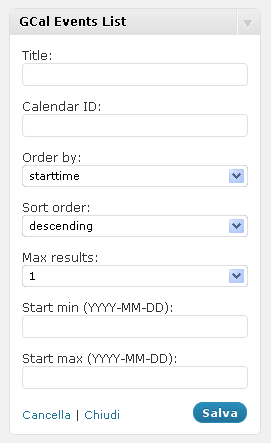
The widget admin panel 
The widget rendered in the front-end
इंस्टॉलेशन
- Extract gcal_events_list.zip
- Upload the plugin folder to the
/wp-content/plugins/directory - Activate the plugin through the ‘Plugins’ menu in WordPress
- Configure your GCal Events List widgets through the widgets admin page.
सामान्य प्रश्न
- Installation Instructions
-
- Extract gcal_events_list.zip
- Upload the plugin folder to the
/wp-content/plugins/directory - Activate the plugin through the ‘Plugins’ menu in WordPress
- Configure your GCal Events List widgets through the widgets admin page.
समीक्षाएं
इस प्लगइन के लिए कोई समीक्षा नहीं है।
सहायक &डेवलपर्स

Translate “GCal Events List” into your language.
Interested in development?
Browse the code, check out the SVN repository, or subscribe to the development log by RSS.
बदलाव विवरण
2.1
- Fixes several errors
2.0
- New version release
1.1
- Minor changes
1.0
- Fix: deprecated PHP4 style constructors in WP 4.3 read more
- Upgrade: support to Google Calendar API V3
0.1
- Initial plugin release