WordPress.org

Hindi

  • थीम्स
  • प्लगइन्स
  • समाचार
  • सहायता
  • हमारे बारे में
  • टीम
  • वर्डप्रेस प्राप्त करें
वर्डप्रेस प्राप्त करें
WordPress.org

Plugin Directory

TD Admin Lock & Load

  • Submit a plugin
  • मेरे प्रिय
  • Log in
  • Submit a plugin
  • मेरे प्रिय
  • Log in

This plugin hasn’t been tested with the latest 3 major releases of WordPress. It may no longer be maintained or supported and may have compatibility issues when used with more recent versions of WordPress.

TD Admin Lock & Load

transcendev द्वारा
डाउनलोड
  • विवरण
  • समीक्षा
  • स्थापना
  • विकास
समर्थन

विवरण

Don’t leave your barn door open! Lock down your admin login form and load up another site instead for unwanted guests.

On servers with limited memory, recursive calls to your WordPress admin login panel alone can lead to serious memory and load
issues that can potentially crash your server. This plugin prevents access to
the login screen without the correct access code appended to the url.

This plugin will kill the process of loading the admin panel prior to the loading of
the template, and other such resource intensive processes that occur even when a user is not yet logged in.

How to Use
1. Create your access code.
2. Click the Activate Admin Lock checkbox.
3. Optionally divert traffic to another url.
4. Future admin login should use the following URL:
http://www.yoursite.com/wp-admin/?a=CODE
Where “CODE” is the access code you enter.

Visit www.TranscenDevelopment.com for more information.

स्क्रीनशॉट्स
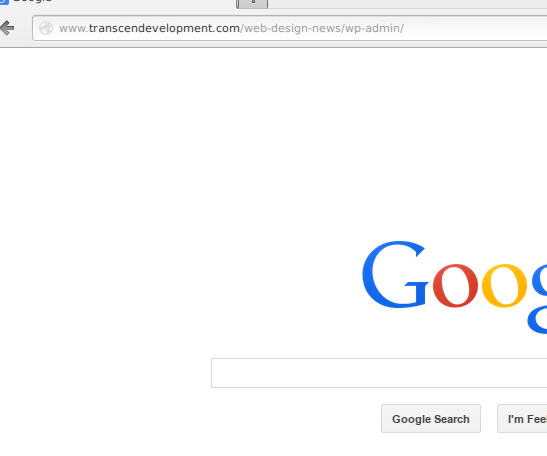
  • Divert unwanted traffic to your admin login off to any url you desire. I’m sending people off to Google. So long suckers!
  • Access the admin login with the proper access code and you’ll have the VIP treatment of being shown your WP login.
  • I’ve successfully logged in with both my access code and my normal username and password.
  • TD Admin Lock, nicely tucked in to your normal WP Settings menu.
  • This is where the magic happens.

इंस्टॉलेशन

  1. Upload the “td-admin-lock” folder to the /wp-content/plugins/ directory
  2. Activate the plugin through the ‘Plugins’ menu in WordPress
  3. Log into Wordpres and go to Settings->TD Lock Admin
  4. Configure and activate as desired

सामान्य प्रश्न

None yet…feel free to ask 🙂

समीक्षाएं

इस प्लगइन के लिए कोई समीक्षा नहीं है।

सहायक &डेवलपर्स

यह खुला स्रोत सॉफ्टवेयर है। अनुगामी लोगो ने इस प्लगइन के लिए योगदान दिया है।

योगदानकर्ता
  • transcendev

Translate “TD Admin Lock & Load” into your language.

Interested in development?

Browse the code, check out the SVN repository, or subscribe to the development log by RSS.

बदलाव विवरण

1.0.1

  • Various bugs fixed

1.0.0

  • A new plugin is born.

मेटा

  • संस्करण 1.0.1
  • Last updated 12 वर्ष पहले
  • Active installations 10+
  • भाषा
    English (US)
  • Tags
    botnetsecuritywordpress security
  • Advanced View

मूल्यांकन

5 out of 5 stars.
  • 1 5-star review 5 stars 1
  • 0 4-star reviews 4 stars 0
  • 0 3-star reviews 3 stars 0
  • 0 2-star reviews 2 stars 0
  • 0 1-star reviews 1 star 0

मेरी समीक्षा जोड़ें

See all reviews

योगदानकर्ता

  • transcendev

समर्थन

कुछ कहना है? कोई मदद चाहिए?

समर्थन फोरम देखें

प्रदान करना

आप इस प्लगइन की उन्नति का समर्थन करना चाहेंगे?

इस प्लगइन को प्रदान करें

  • बारे में
  • समाचार
  • होस्टिंग
  • गोपनीयता
  • शोकेस
  • थीम्स
  • प्लगइन
  • पैटर्न्स
  • सीखे
  • सहायता
  • डेवलपर्स
  • WordPress.TV ↗
  • शामिल होइये
  • ईवेंट्स
  • दान करें ↗
  • भविष्य के लिए पांच
  • वर्डप्रेस.कॉम ↗
  • मैट ↗
  • बीबीप्रेस ↗
  • बडीप्रेस ↗
WordPress.org
WordPress.org

Hindi

  • Visit our X (formerly Twitter) account
  • हमारे बलुस्की खाते पर जाएँ
  • Visit our Mastodon account
  • हमारे थ्रेड्स अकाउंट पर जाएं
  • हमारे फेसबुक पेज पर जाएँ
  • हमारे इंस्टाग्राम अकाउंट पर जाएं
  • हमारे लिंक्डइन खाते पर जाएँ
  • हमारे टिकटॉक खाते पर जाएँ
  • हमारे यूट्यूब चैनल पर जाएं
  • हमारे Tumblr खाते पर जाएँ
कोड काव्य हैं।