WordPress.org

Hindi

  • थीम्स
  • प्लगइन्स
  • समाचार
  • सहायता
  • हमारे बारे में
  • टीम
  • वर्डप्रेस प्राप्त करें
वर्डप्रेस प्राप्त करें
WordPress.org

Plugin Directory

WP Adminify – White Label WordPress, Admin Menu Editor, Login Customizer

  • Submit a plugin
  • मेरे प्रिय
  • Log in
  • Submit a plugin
  • मेरे प्रिय
  • Log in

WP Adminify – White Label WordPress, Admin Menu Editor, Login Customizer

Liton Arefin द्वारा
डाउनलोड
  • विवरण
  • समीक्षा
  • स्थापना
  • विकास
समर्थन

विवरण

WP Adminify: The Ultimate White Label WordPress Plugin with Admin Menu Editor, Login Customizer, and Custom Dashboard Solution

Ever wondered how to modify the default WordPress admin dashboard? WP Adminify is the most suitable White Label WordPress plugin and Admin Menu Editor solution on the market, specifically developed for WordPress agencies, freelance developers, and power users. This all-in-one WordPress admin customizer plugin offers you to completely rebrand the WordPress dashboard, transform the user experience, and create a branded client dashboard for your customers or personal websites. With over 60 powerful features, WP Adminify gives you control over customizing your WordPress dashboard, from the login screen to the smallest admin menu item, dramatically boosting productivity and enhancing security.

➡️ See Live Demo | 📖 Read Comprehensive Documentation | ⚡ Upgrade to WP Adminify Pro

🎬 Video Overview: See WP Adminify in Action

Why WP Adminify is the Best WordPress Dashboard Customizer

  • ✅ Complete White Label WordPress Solution: Remove every trace of WordPress branding. Rebrand the admin panel with your own logo, change admin menu labels, customize the admin footer text, replace the “Howdy” text, and create a fully white labeled WordPress experience that presents your agency as the platform provider.

  • ✅ Powerful Drag & Drop Admin Menu Editor: The most intuitive Admin Menu Editor available. Visually rearrange, rename, add new menu items, hide unnecessary elements, and create a custom admin menu structure with role-based visibility rules. Simplify navigation for clients and prevent them from accessing complex areas like themes and plugins.

  • ✅ Custom Login Page Designer (Login Customizer): Extend your white label WordPress strategy to the login screen. Our Login Customizer module (Loginfy) allows you to design a stunning custom login screen with background images, custom logos, form styling, animations, and custom CSS. Make a powerful first impression with a branded login page.

  • ✅ Unmatched WordPress Dashboard Customization: Choose from multiple modern UI templates (Light, Dark, Modern) to instantly transform your WordPress admin dashboard. Enable dark mode for WordPress, schedule light/dark mode switching, and customize colors and fonts to create a truly custom WordPress dashboard.

  • ✅ Advanced Productivity Boosters: Organize your entire media library with folders and subfolders, replace media files without changing URLs (upcoming), hide annoying admin notices, remove the welcome panel, duplicate posts and pages, and add custom dashboard widgets for RSS feeds or client information.

  • ✅ Security & Hardening Tools: Harden your WordPress security. Change the login URL from /wp-admin to something unique, set custom login redirects and logout redirects based on user roles, disable comments globally across your site, disable XML-RPC, restrict REST API access, and clean up unnecessary scripts from the <head> section.

  • ✅ Admin Columns Editor: Gain complete control over your post and page list views. This powerful addon allows you to customize admin columns, add new columns for custom fields (ACF, MetaBox, Pods), remove default columns, and make columns sortable and filterable. Perfect for managing WooCommerce products, orders, and any custom post type efficiently.

Detailed Feature Breakdown

WP Adminify is packed with features designed for every aspect of WordPress admin customization.

🎨 White Label WordPress & Dashboard UI Customization

  • White Label Admin Area: Replace the WordPress logo in the admin bar and menu. Upload a custom favicon for the admin area. Change the “WordPress” name in the title tag.
  • Custom Admin Footer Text: Remove the “Thank you for creating with WordPress” text and replace it with your own branded footer text, links, or copyright information.
  • Admin UI Templates: Apply beautiful, pre-designed skins to instantly change the entire look and feel of your WordPress dashboard. Options include Light, Dark, Gradient, and Glass morphism styles.
  • Light and Dark Mode: Offer users a choice or enable auto-scheduling. Set independent logos for light and dark modes for a seamless white label experience.
  • Custom CSS and JavaScript: For developers who need ultimate control, add your own custom CSS to style every element of the admin area or custom JavaScript to modify functionality, all without touching theme files.

🧩 Advanced Admin Menu Editor

  • Visual Drag & Drop Interface: Intuitively manage your admin menu. Drag to reorder menu items, drag submenus to create top-level menus, or drag items out to hide them completely.
  • Create Custom Menu Items: Add new menu items that link to internal admin pages, external URLs, or custom admin pages created with page builders.
  • Role-Based Menu Visibility: Show or hide specific menus and submenus for different user roles. Perfect for creating a simplified client dashboard for subscribers, customers, or editors by hiding complex menus like “Themes”, “Plugins”, “Tools”, and “Settings”.
  • Custom Icons for Menu Items: Assign custom Dashicons or upload your own SVG icons to any menu item for improved visual recognition and branding.
  • Separators and Dividers: Add custom separators to group menu items logically and improve the navigation structure.

🔐 Login Customizer (Loginfy)

  • Custom Login Logo: Upload a custom logo for your login screen that matches your client’s brand.
  • Background Customization: Set a background image, background color, gradient, or slideshow for the login page.
  • Form Styling: Customize the login form’s width, background color, border radius, shadow, and opacity.
  • Button Styling: Change the login button’s color, hover color, and text to match your brand identity.
  • Custom CSS: For pixel-perfect control, add custom CSS to the login page to override any style.

📁 Media Library Folders & Management

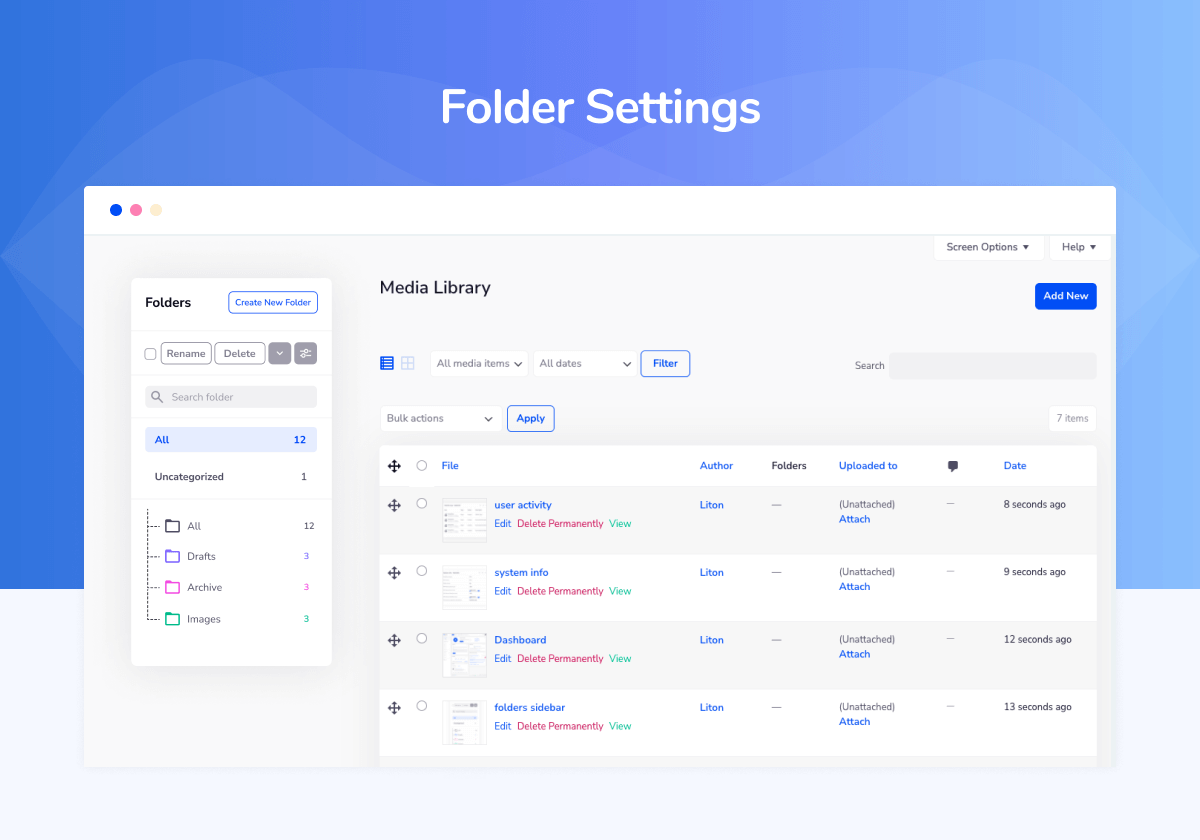
  • Drag & Drop Folders: Finally, organize your media library! Create folders and subfolders and simply drag and drop files into them. This is essential for sites with thousands of images.
  • Folder-Based Filtering: Quickly find files by browsing through your folder structure instead of scrolling through an endless list.
  • Bulk Move Files: Select multiple files and move them to a new folder in one action.
  • 👉 Media Replace Feature: (upcoming) A groundbreaking productivity tool. Replace any existing image or file in the media library while retaining its URL, file ID, and date. This is critical for SEO (prevents broken links) and for quickly updating images without needing to find and replace them in every post.

⚙️ Productivity & Admin Management Tools

  • Admin Notices Manager: Disable all promotional and update notification nags from WordPress core and third-party plugins. Clean your dashboard and create a focused Admin Panel.
  • Remove Welcome Panel: Instantly remove the default “Welcome to WordPress” panel from the dashboard.
  • Hide Screen Options & Help Tabs: Remove the “Screen Options” and “Help” tabs from the top of admin screens for a cleaner interface.
  • Duplicate Posts, Pages, & CPTs: Add a “Duplicate” action to the post list for any post type, allowing you to clone content with a single click.
  • Custom Dashboard Widgets: Add, remove, or modify widgets on the WordPress dashboard. Add custom text widgets, RSS feed widgets, or iframe widgets to display relevant information for you or your clients.

🛡️ Security & Performance Optimization

  • Change Login URL: Increase your security by changing the default WordPress login URL (wp-login.php or /wp-admin) to a custom slug of your choice, helping to prevent brute force attacks.
  • Login Redirects & Logout Redirects: Control exactly where users are sent after they login or logout based on their specific user role. Send customers to their account page, admins to the dashboard, etc.
  • Disable Comments Globally: Turn off the native WordPress comment system site-wide. This removes comment fields, hides admin menu items, and closes comments on existing posts.
  • Control Heartbeat API: Modify the interval or disable the WordPress Heartbeat API in specific areas (dashboard, post/edit pages, frontend) to reduce server load and CPU usage on high-traffic sites.
  • Disable Embeds: Disable WordPress oEmbeds to improve security and prevent external sites from embedding your content without permission.
  • Clean Up Head Section: Remove unnecessary code like RSS feed links, RSD (Really Simple Discovery) links, WLW Manifest, shortlink, generator tag, and emoji scripts to reduce bloat and improve security.

📊 Admin Columns Pro Editor

  • Add/Remove/Reorder Columns: Take full control of the list views for posts, pages, and all custom post types. Add new columns for any data point, remove unnecessary columns, and reorder them to match your workflow.
  • Custom Field Support: Display values from Advanced Custom Fields (ACF), MetaBox, Pods, and other custom field plugins directly in your admin list tables.
  • WooCommerce Integration: Customize columns for WooCommerce post types. Show product SKU, stock status, price, or weight directly in the product list for quick management.
  • Sortable & Filterable Columns: (upcoming) Make your custom columns sortable A-Z or numerically and add custom filters to the top of the list tables for powerful data management.

🔌 Expansive Addon System

WP Adminify’s functionality is extended through dedicated addons, many of which are free.

  • Admin Bar Editor: Customize the WordPress admin toolbar that appears at the top of the site when logged in.
  • Activity Logs: Track every user action on your site, including logins, post changes, option updates, and plugin activity.
  • Google PageSpeed Insights: Check your website’s performance score directly from your WordPress dashboard and get actionable recommendations.
  • RoleMaster Suite (User Role Editor): A comprehensive tool to create, edit, clone, and manage user roles and capabilities with precision.
  • Header & Footer Scripts: Easily add Google Analytics, Facebook Pixel, custom CSS, or any other script to your site’s header or footer without editing theme files.
  • Sidebar Generator: Create unlimited custom widget-ready sidebars and assign them to specific pages, posts, or conditions.

🚀 Get WP Adminify Pro Today – Unlock Every Feature!

स्क्रीनशॉट्स

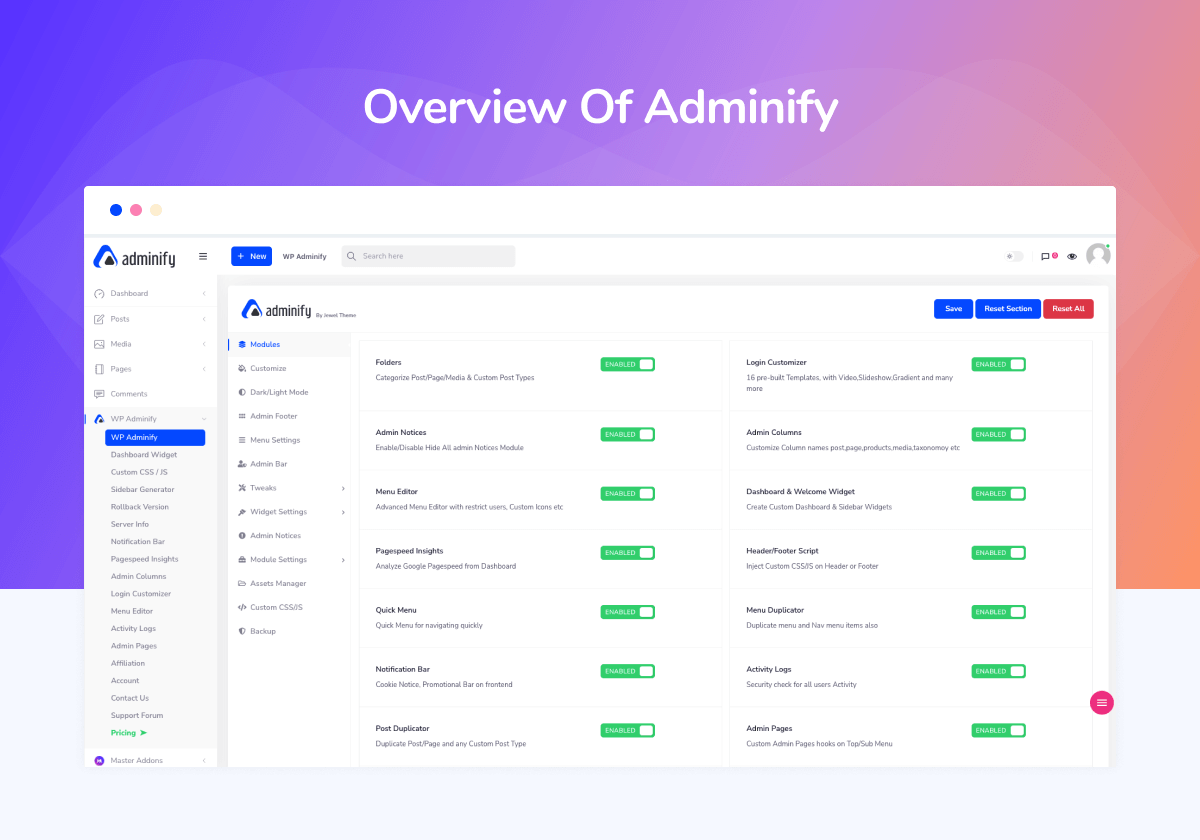
  • The main WP Adminify settings panel – The control center for all your customization.
  • The powerful Drag & Drop Admin Menu Editor in action.
  • The Login Customizer (Loginfy) interface, designing a custom login screen.
  • Enhance WordPress Dashboard security by chnaing url, enable redirection and more
  • Media Library Folders – Organizing files with a drag-and-drop folder system.
  • The White Label settings page, showing options to rebrand the admin footer.
  • The module settings page showing various addons like Activity Logs.

इंस्टॉलेशन

  1. Navigate to Plugins > Add New within your WordPress admin.
  2. Search for “WP Adminify”.
  3. Click “Install Now” and then “Activate”.
  4. A new menu item “WP Adminify” will appear. Click on it to start customizing!
  5. (Optional) For even more power, upgrade to Pro to unlock all addons and features.

सामान्य प्रश्न

Can I use the white label features for free?

Yes! The free version includes robust white-labeling options. The Pro version unlocks even more advanced branding controls.

Will this plugin slow down my website?

No. WP Adminify is built for performance. It only loads its scripts on the WordPress admin area, leaving your front-end site speed completely unaffected.

Is it compatible with my theme and other plugins?

Absolutely. WP Adminify is designed to be compatible with all standard WordPress themes and most popular plugins.

Do I need coding skills to use it?

Not at all. WP Adminify provides an intuitive, point-and-click interface. No code required!

How do I get support?

Our dedicated support team is ready to help. Pro users get priority support. Contact us here.

समीक्षाएं

GPDR compliant not existing!

tomeee अक्टूबर 27, 2025 2 जवाब
The plugin is not GDPR compliant! If you deactivate Google Fonts in the Backend, the page malfunctions. Support cannot solve the problem and will not issue a refund due to this deficiency. Completely useless, and switching from a complete plugin to many small individual plugins was an equally unfortunate decision. I have asked for a refund several times, but instead they keep sending me newsletters, which I have unsubscribed from. In the end, the advertising promises are absolutely worthless. They didn’t even want to give me a partial refund when I asked for it. So I bought the plugin two years ago and haven’t been able to use it yet. Thanks for nothing.

Pop-up Ads at Premium Subscription

guilhermepop29 सितम्बर 24, 2025
The plugin performs well but when it comes to annoing you by showing ads they are really one of a kind. Even with a annual Premium Subscription they had the smartest decision to show ads under Notification Notices and even now they made a pop-up Ad at my website backend. I find it very disrespectiful. They are not seeing my renewal after this.

STAY AWAY

Hamid Moghaddasi सितम्बर 15, 2025
It messed with website dashboard and I can’t find a way to revert everything back to normal. Despite reporting the bugs and issues I had, they did not refund me, which their website totally lies about. Don’t trust them. They are just a bunch of thieves.

Good support

loodusemees अगस्त 24, 2025
I experienced a compatibility issue between the Adminify and Shopengine plugins. Adminify team solved this problem very quickly. Thank you very much!

The support is also perfect.

Yumiko Matsushima अगस्त 22, 2025
It’s still early days, so it’s too soon to evaluate, but it feels very promising at this initial stage.It also seems to be compatible with Metabox.io.The support team was very quick and helpful, which was a great help.Give it a try by installing it first!

its come a long way

trait जुलाई 25, 2025 1 जवाब
i’m leaving this review today because of how impressed i am with adminify plugin these past few updates have really made it alot better, as an appsumo buyer i was pretty upset when the plugin was broken up , because it was too heavy. today i feel like the adminify team has delivered on their promise of a truly custom feel to wordpress, regardless of the other features it was supposed to have. if your looking for a custom dashboard editor thats lightweight i would recommend wp adminify as of today july/2025 and team i will be removing my negative review on appsumo and changing it to a positive , you’ve earned it!
93 के सभी समीक्षा पढ़ें

सहायक &डेवलपर्स

यह खुला स्रोत सॉफ्टवेयर है। अनुगामी लोगो ने इस प्लगइन के लिए योगदान दिया है।

योगदानकर्ता
  • Liton Arefin
  • Jewel Theme
  • Master Addons

“WP Adminify – White Label WordPress, Admin Menu Editor, Login Customizer” has been translated into 4 locales. Thank you to the translators for their contributions.

Translate “WP Adminify – White Label WordPress, Admin Menu Editor, Login Customizer” into your language.

Interested in development?

Browse the code, check out the SVN repository, or subscribe to the development log by RSS.

बदलाव विवरण

4.0.5.5 (12-10-2025)

  • Fixed: Admin bar menu submenu links.
  • Fixed: support url for adminify dashboard.

4.0.5.4 (09-10-2025)

  • Fixed: Admin bar link was unresponsive.
  • Fixed: Admin menu was unresponsive while no title.

4.0.5.3 (06-10-2025)

  • UI Improvement: Improved UI for Adminify Admin Notice.
  • Security Upgrade: Security updated.

4.0.5.2 (21-09-2025)

  • UI Improvement: Improved UI for Adminify settings.

4.0.5.1 (21-09-2025)

  • Compatibility: Added Plugin compatibility support for “WPBakery visual page builder” Premium wordpress Plugin .
  • UI Improvement: Improved UI for dark light mode switcher.
  • Fix: Console warning fixed for light dark mode switcher.

4.0.5.0 (18-09-2025)

  • Compatibility: Added Plugin compatibility support for “BrightHub” Premium wordpress theme .
  • Compatibility: Added Plugin compatibility support for “WP Activity Log” plugin.
  • Compatibility: Added Plugin compatibility support for “WooCommerce Orders Tracking” plugin.

4.0.4.9 (26-08-2025)

  • Improve: database upgrade issue.
  • Compatibility: Added Plugin compatibility support for “Email Template Customizer for WooCommerce” plugin.

4.0.4.8 (24-08-2025)

  • Improve: UI improvement.
    ➡️ View Full Changelog

मेटा

  • संस्करण 4.0.5.5
  • Last updated 1 महीना पहले
  • Active installations 7,000+
  • WordPress version 5.0 या ज्यादा
  • Tested up to 6.8.3
  • PHP version 7.4 या ज्यादा
  • Languages

    Bengali (Bangladesh), Chinese (China), English (US), Korean, और Russian.

    अपनी भाषा में अनुवादित करें

  • Tags
    admin columnsadmin menu editorcustom dashboardlogin customizerwhite label WordPress
  • Advanced View

मूल्यांकन

4.2 out of 5 stars.
  • 67 5-star reviews 5 stars 67
  • 8 4-star reviews 4 stars 8
  • 3 3-star reviews 3 stars 3
  • 2 2-star reviews 2 stars 2
  • 13 1-star reviews 1 star 13

मेरी समीक्षा जोड़ें

See all reviews

योगदानकर्ता

  • Liton Arefin
  • Jewel Theme
  • Master Addons

समर्थन

पिछले दो महीने में हल विषय:

9 out of 9

समर्थन फोरम देखें

  • बारे में
  • समाचार
  • होस्टिंग
  • गोपनीयता
  • शोकेस
  • थीम्स
  • प्लगइन
  • पैटर्न्स
  • सीखे
  • सहायता
  • डेवलपर्स
  • WordPress.TV ↗
  • शामिल होइये
  • ईवेंट्स
  • दान करें ↗
  • भविष्य के लिए पांच
  • वर्डप्रेस.कॉम ↗
  • मैट ↗
  • बीबीप्रेस ↗
  • बडीप्रेस ↗
WordPress.org
WordPress.org

Hindi

  • Visit our X (formerly Twitter) account
  • हमारे बलुस्की खाते पर जाएँ
  • Visit our Mastodon account
  • हमारे थ्रेड्स अकाउंट पर जाएं
  • हमारे फेसबुक पेज पर जाएँ
  • हमारे इंस्टाग्राम अकाउंट पर जाएं
  • हमारे लिंक्डइन खाते पर जाएँ
  • हमारे टिकटॉक खाते पर जाएँ
  • हमारे यूट्यूब चैनल पर जाएं
  • हमारे Tumblr खाते पर जाएँ
कोड काव्य हैं।